Building software for a small business is straightforward until it is not. The real challenge is not getting something working on day one; it is making sure that same system does not collapse the moment your user base doubles, your team expands, or your product needs to do ten times more than it did at launch. Smart software development for small businesses means making decisions early that protect you later, and this guide walks through exactly how to do that.
Why Most Small Business Software Fails to Scale
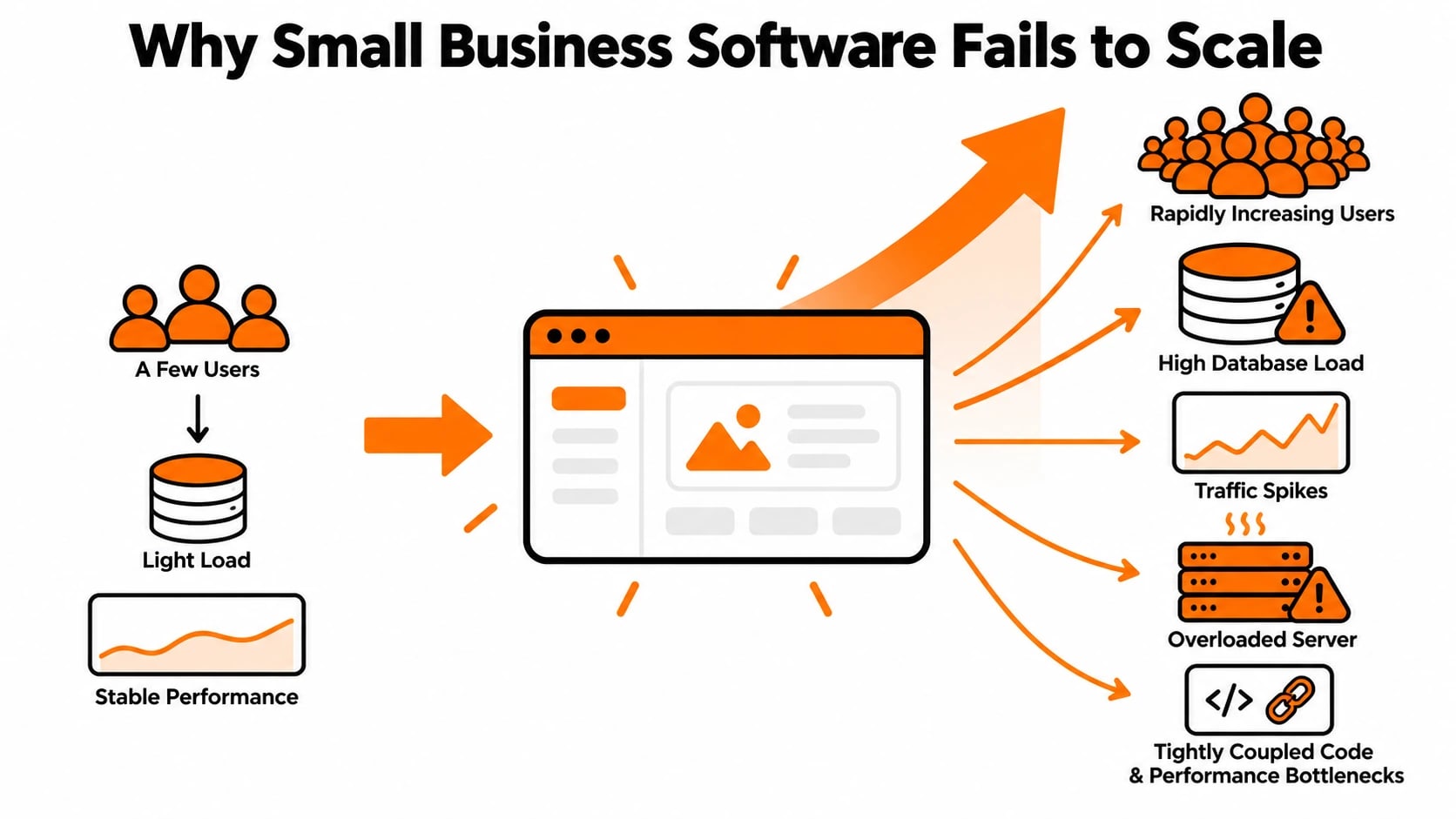
The pattern is painfully common. A small business needs a web application, an internal tool, or a customer-facing product. They hire a developer or a small agency, set a tight budget, and launch something that works. For a while, everything is fine. Then growth kicks in, or the product needs new features, or more users arrive, and the whole system starts groaning under pressure.
The root cause is almost always the same: the software was built for right now, not for what comes next. This happens for a few specific reasons.
Short-term thinking in the tech stack. Many small business applications are built with whatever is fastest or cheapest to deploy in the moment. That often means tightly coupled code, a single monolithic application, or a database structure that made sense for 500 users but becomes a bottleneck at 50,000.
No separation of concerns. When business logic, data access, and user interface code are all tangled together, adding a single new feature becomes a high-risk operation. Every change touches everything else, making the system fragile and expensive to maintain over time.
Ignoring infrastructure from the start. Hosting a small app on a single server with no load balancing, no caching layer, and no database replication works fine until it does not. When traffic spikes or data volume grows, there is nowhere to go without a full rewrite.
No API layer. Businesses often discover later that they need a mobile app, a third-party integration, or a partner portal. If the original application was built without a clean API, adding these becomes a costly engineering project instead of a natural extension.
The good news is that none of these problems require a massive upfront budget to avoid. They require thoughtful decisions early in the development process, and that starts with architecture.
To understand Software Development for Small Businesses That Scale, it helps to compare what you see in the data and what action you need to take next.
Choosing the Right Architecture for a Small Business That Plans to Grow
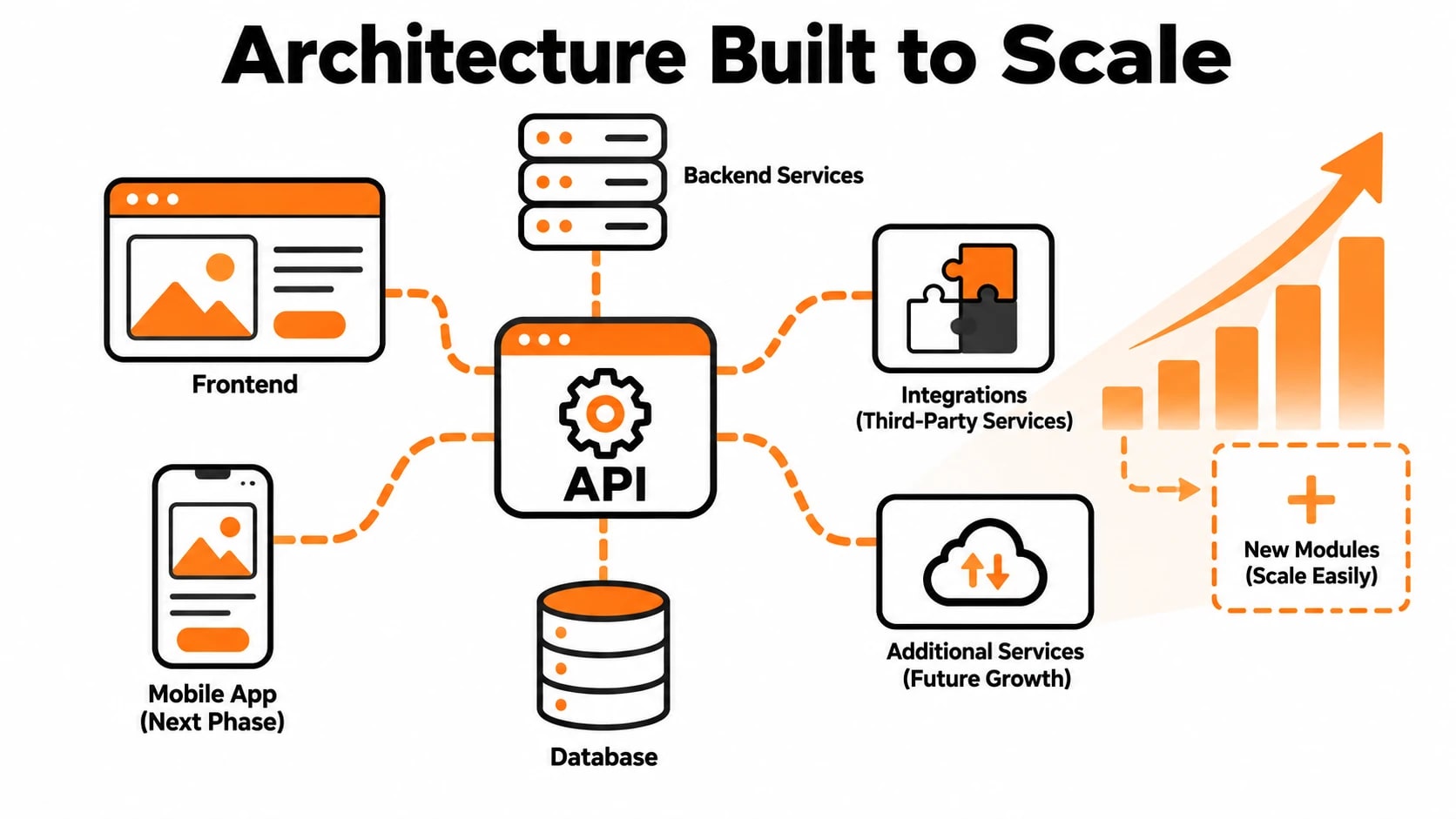
Architecture is one of those words that sounds intimidating but really just means how your software is organized and how its pieces communicate with each other. The right architecture for a small business does not need to be complicated. It needs to be appropriate for where you are now while leaving clear paths to grow.
Start modular, not monolithic. A monolithic application puts everything in one place. That can work for a very early-stage product, but it creates serious problems as complexity grows. A modular approach, even within a single codebase, organizes your application into distinct, loosely connected sections. Each section handles its own responsibilities. When you need to scale one part of the system, like your payment processing or your reporting engine, you can do it without touching everything else.
Consider a service-oriented structure when complexity justifies it. Microservices get a lot of attention, but they introduce operational overhead that is often overkill for small teams. A practical middle ground is a service-oriented structure where your application is broken into a small number of logical services, each with a clear responsibility, but without the full complexity of managing dozens of independent deployments. This gives you flexibility without overwhelming a lean engineering team.
Build around an API from day one. Whether you are building a web application, an internal business tool, or a SaaS product, designing around a clean API layer from the start is one of the highest-return decisions you can make. It means your front end is decoupled from your back end. It means future mobile apps, integrations, and partner tools can connect without requiring a rebuild. It also means your system is easier to test and easier to hand off to new developers.
Plan your database for growth. Database design decisions made early are extremely hard to reverse later. Choosing between a relational database and a NoSQL solution should be driven by your actual data structure and query patterns, not by trends. For most small business applications, a well-indexed relational database with proper normalization handles significant scale. The key is building in connection pooling, avoiding heavy queries in hot paths, and knowing when to introduce caching before you actually need it.
The architecture you choose at the start does not lock you in forever, but it does set the cost of every change you make afterward. Getting this right early is one of the most valuable investments a small business can make in its software.
Build vs. Buy: Making the Right Call for Each Part of Your Product
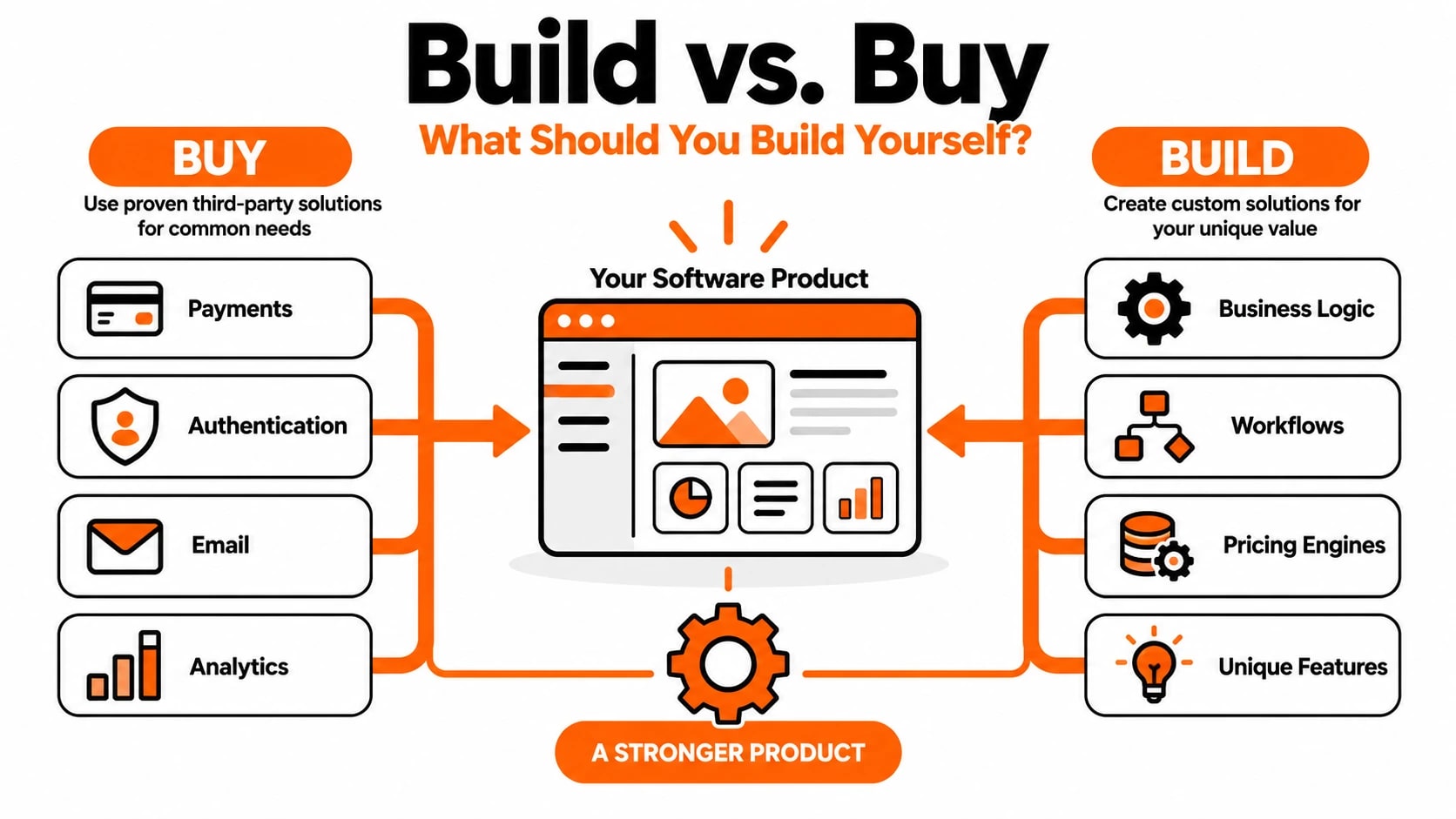
One of the most consequential decisions small businesses face is whether to build custom software or buy an off-the-shelf solution. The honest answer is that neither approach wins across the board. Most successful software products end up as a hybrid, using third-party tools for commodity functionality and custom code for the features that actually differentiate the business. Getting this balance right early on saves enormous amounts of money, time, and technical debt later.
The core question to ask for any feature is: does this give us a competitive advantage? Payment processing, email delivery, authentication, and analytics are not competitive advantages. They are plumbing. Buying these through established services means you get battle-tested reliability without maintaining complex systems yourself. On the other hand, your pricing engine, your recommendation logic, your workflow automation, or anything that reflects how your business uniquely operates- these are worth building. They encode your business model in code, and that is something no generic tool can replicate for you.
As you grow, the calculus can shift. A tool that costs $49 per month at 500 users might cost $4,900 per month at 50,000 users, at which point building an internal replacement becomes economically sensible. Plan for this by keeping third-party dependencies modular and abstracted behind internal interfaces, so swapping them out later does not require rewriting core product logic.
| Function | Recommended Approach | Reason |
|---|---|---|
| Payment processing | Buy | Compliance, security, and maintenance are enormous |
| User authentication | Buy | Security risks make custom implementations dangerous |
| Core business logic | Build | Reflects your unique model and competitive edge |
| Email and SMS delivery | Buy | Deliverability requires specialised infrastructure |
| Customer-facing workflows | Build | Differentiates your product experience |
| Reporting and dashboards | Hybrid | Buy tools but build the data layer that feeds them |
Database Design and Performance Choices That Prevent Growing Pains
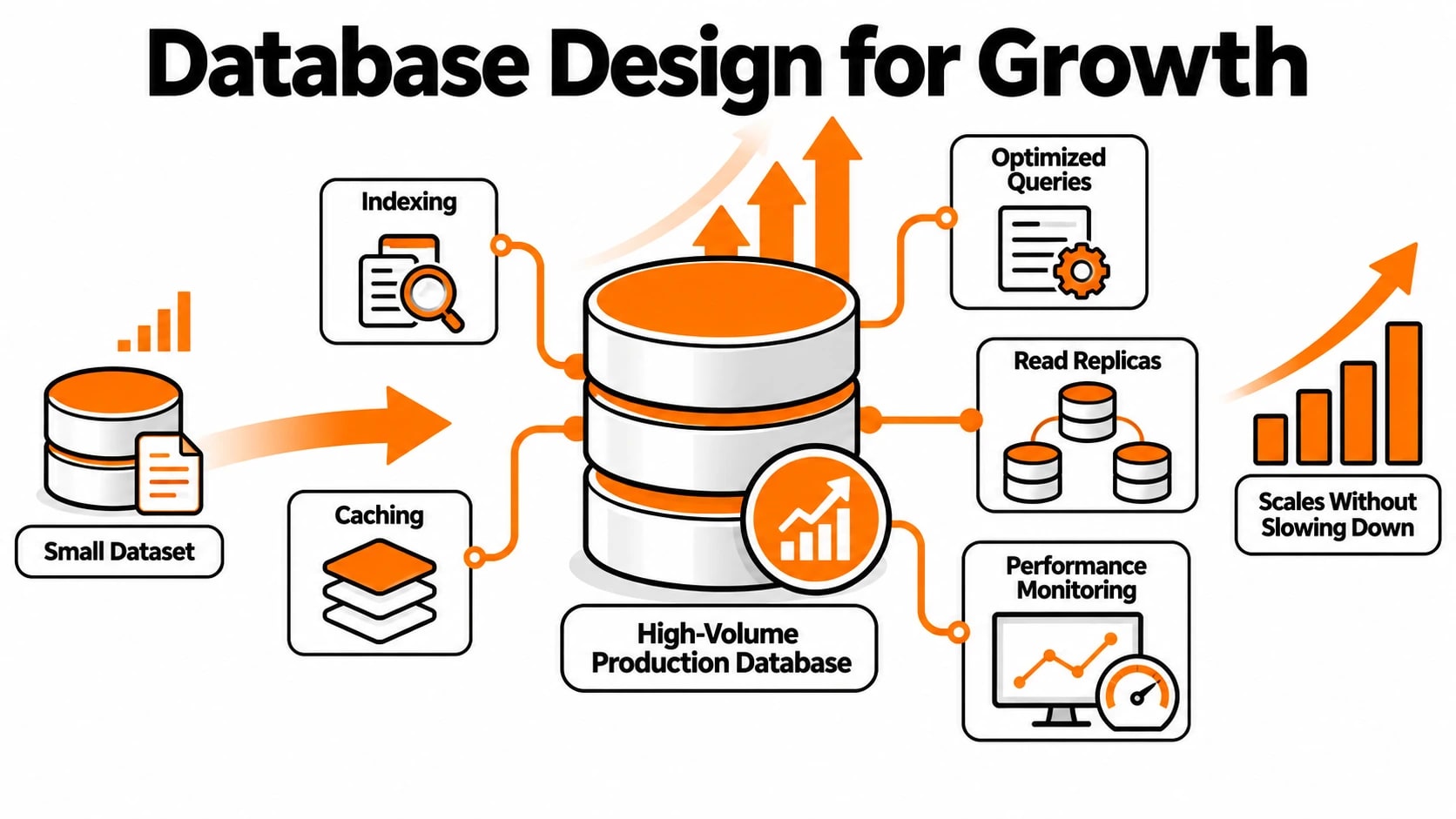
Poor database design is one of the quietest killers of growing software products. Applications that feel fast and responsive at a few hundred records can grind to a halt when those records number in the millions. The problem rarely comes from choosing the wrong database technology. It comes from making structural decisions early on that were never reconsidered as load increased. Good database design is not about being clever at the start; it is about making choices that remain valid as the data grows.
A few principles make a significant difference at scale. Indexing the columns you actually query against is foundational, yet it is routinely missed in early builds. Avoiding deeply nested data structures in relational databases prevents expensive joins later. Separating read and write operations, even informally at first, allows you to add read replicas when query volume spikes without restructuring your application. Keeping database migrations reversible and tested means you can deploy schema changes safely without downtime, which matters more as your user base grows.
- Use appropriate data types: Storing numbers as strings or dates as plain text causes sorting and filtering problems at scale.
- Index foreign keys: Unindexed foreign keys cause full table scans that become catastrophic with large datasets.
- Avoid SELECT *: Fetching only the columns you need reduces memory usage and speeds up queries significantly.
- Plan for soft deletes: Deleting records permanently early on creates audit and recovery headaches later.
- Normalise, but not obsessively: Over-normalisation creates query complexity; find the balance that matches your read patterns.
| Database Choice | Best For | Scaling Consideration |
|---|---|---|
| PostgreSQL | Relational, transactional data | Handles complex queries well; supports read replicas |
| MySQL | High-read web applications | Mature replication support; wide hosting availability |
| MongoDB | Flexible, document-heavy data | Horizontal scaling is built in; schema flexibility has tradeoffs |
| Redis | Caching, session storage, queues | Extremely fast but not a primary data store |
How to Work With a Development Partner to Build Software That Scales
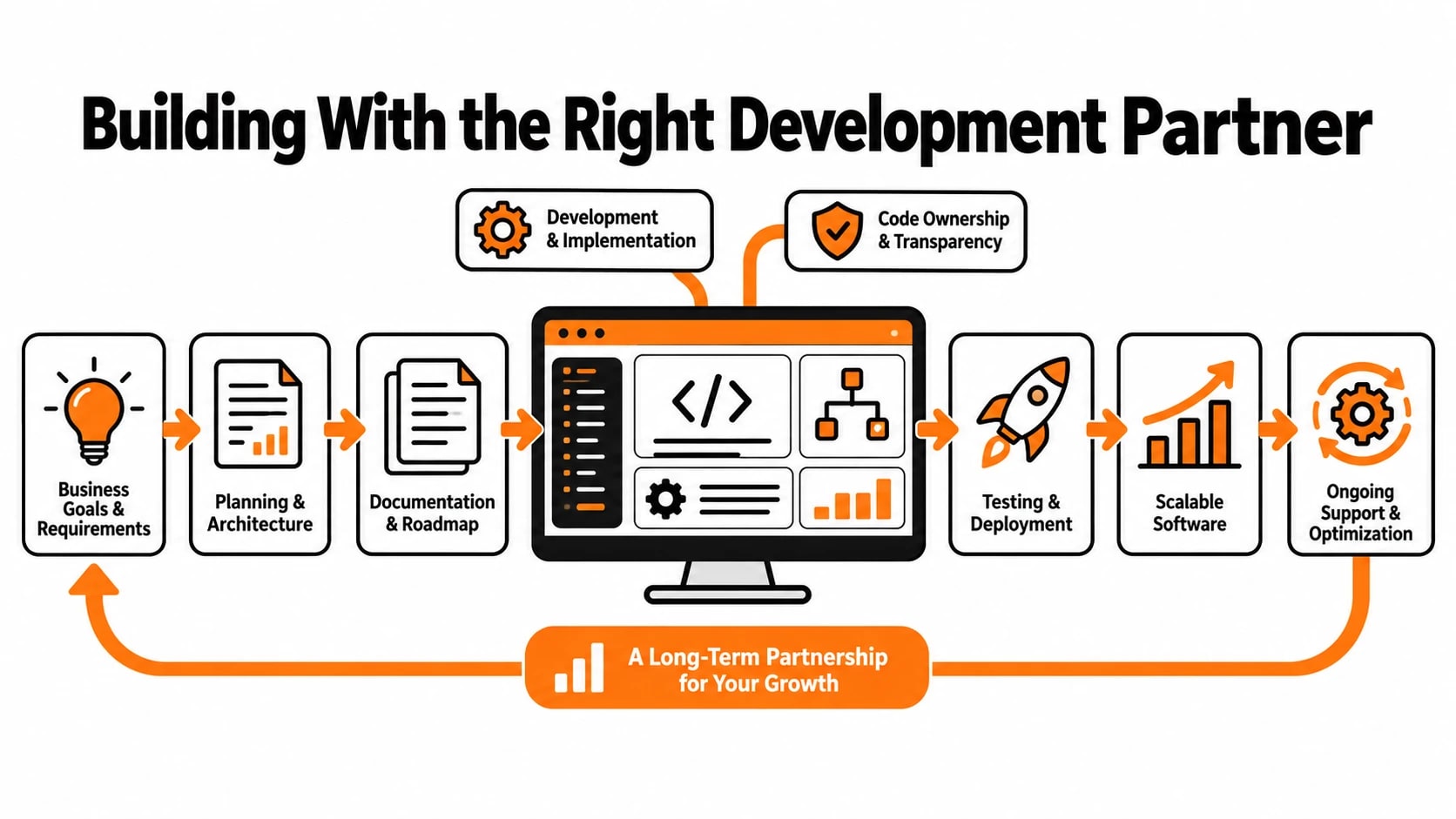
Hiring a development partner is not simply a matter of outsourcing work. It is a decision that shapes your software's architecture, quality, and long-term maintainability. Small businesses often approach this process by focusing almost entirely on cost, which is understandable, but it tends to produce software that needs to be rebuilt within two or three years. The right partner brings technical judgment to the table, not just execution. They should be asking questions about your growth projections, your data volumes, and your future feature plans before writing a single line of code.
Clear communication structures matter as much as technical skill. Before starting any engagement, establish who owns technical decisions on your side, how frequently you expect progress updates, and what the handover process looks like if the relationship ends. Good development partners document their architectural decisions and write code that your own team, or a future team, can read and extend. This is not a given. Ask to see examples of previous work, review codebases if you can, and speak to past clients about what it was like to maintain the software after the initial build was complete.
- Ask about scalability upfront: A good partner should bring this up before you do and propose an architecture that fits your growth trajectory.
- Insist on documentation: Architecture decisions, API contracts, and deployment processes should all be written down, not just understood by the team.
- Request scalability milestones: Define what the software should handle at launch, at 10x growth, and at 100x growth, and make these part of the brief.
- Agree on code ownership from day one: Repositories, credentials, and deployment pipelines should belong to you, not the agency.
- Plan for handover or ongoing support: Know in advance whether you will maintain the codebase internally or retain the partner for updates.
Working with a partner like Techlad means scalability considerations are built into the development process from the start, not retrofitted when performance issues appear. The goal is software that supports your business at its current size and does not become an obstacle when growth accelerates. That requires honesty about where you are now and technical planning for where you intend to go.
Security and Compliance Foundations That Grow With You
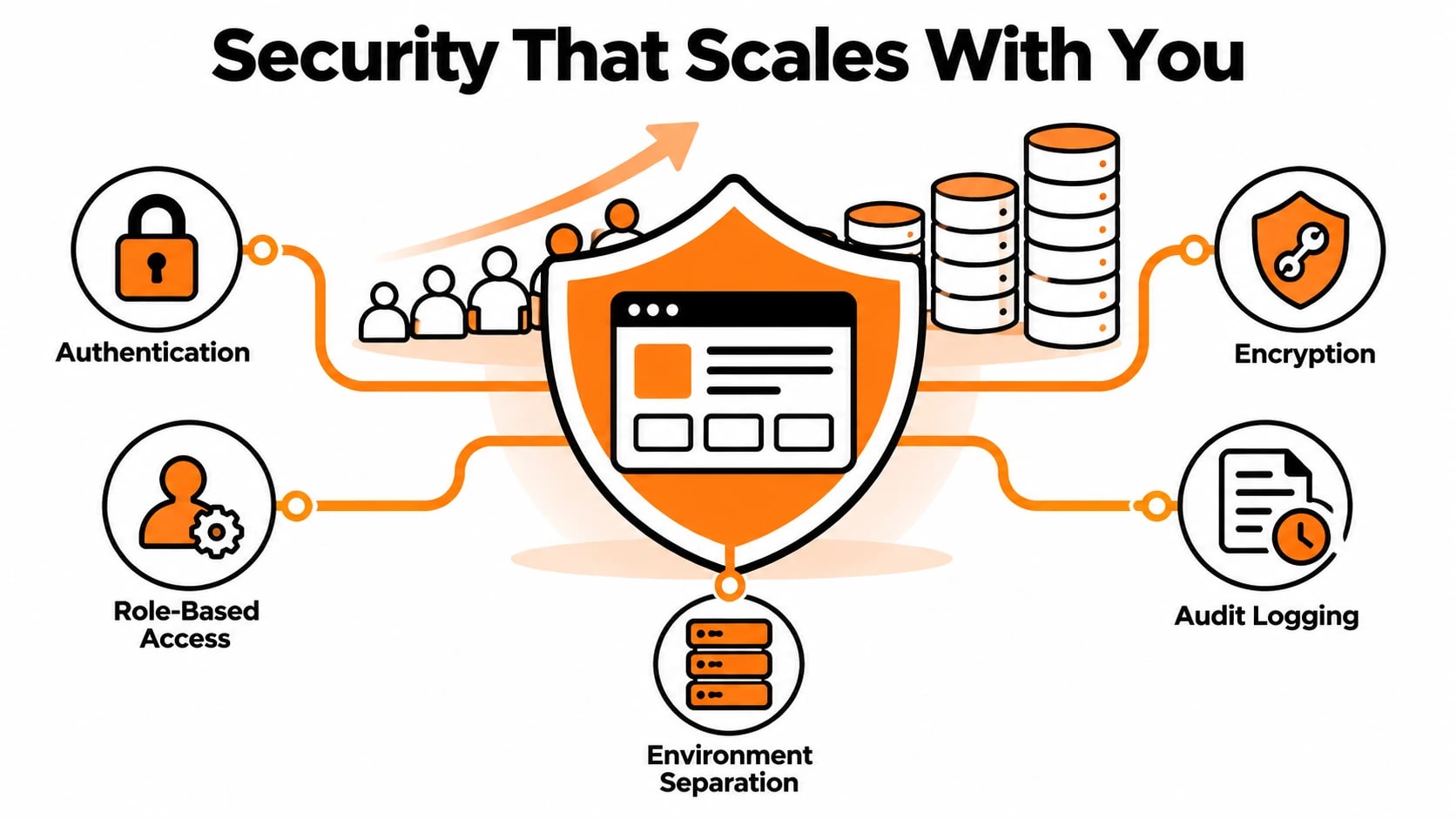
Security is one of the areas where small businesses most often cut corners early, and then pay a significant price later. When you have ten users, a loose authentication setup feels manageable. When you have ten thousand users storing sensitive data, that same setup becomes a liability that can cost you customers, contracts, and reputation.
Building security into your software from the start is not about being paranoid. It is about making smart choices now that do not require expensive rewrites when you grow into regulated industries, enterprise clients, or international markets.
Here are the security and compliance foundations worth getting right from day one:
- Authentication and authorization: Use a proven identity provider rather than building your own login system. Role-based access control should be part of your data model early, not bolted on later.
- Data encryption: Encrypt sensitive data at rest and in transit. This is table stakes for any modern application and a hard requirement if you want to work with healthcare, finance, or enterprise clients.
- Audit logging: Record who did what and when. This is essential for debugging, compliance, and fraud detection as your user base grows.
- Environment separation: Keep production, staging, and development environments completely separate, with different credentials and access controls for each.
- Dependency management: Outdated packages are one of the most common sources of security vulnerabilities. Automate dependency scanning and updates from the beginning.
- GDPR and data residency: If you plan to serve customers in Europe or regulated industries, design your data storage with jurisdiction in mind before you have users, not after.
Getting these foundations right does not require a large budget. It requires discipline and the right development partner who treats security as part of the build process, not an afterthought.
Monitoring, Observability, and Knowing When Something Is Wrong
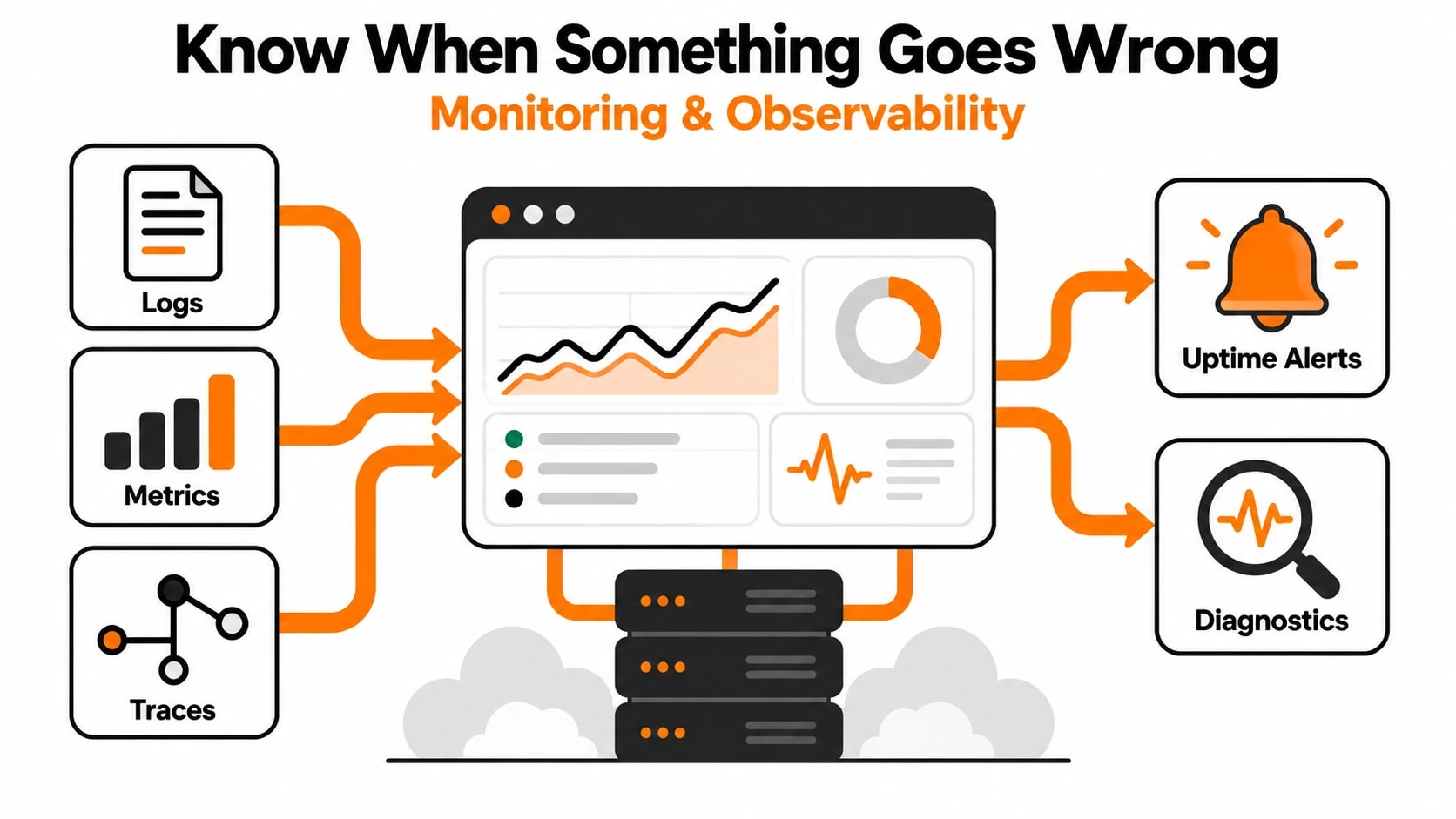
A lot of small business software runs blind. There are no alerts, no dashboards, and no visibility into what is actually happening inside the application. You find out about problems when a customer sends an angry email. That works at a very small scale, but it breaks down quickly as usage grows.
Observability means your system can tell you what it is doing without you having to ask. It is built from three things: logs, metrics, and traces. Together they give you the information you need to diagnose problems fast and make confident deployment decisions.
| Observability Layer | What It Tells You | Common Tools |
|---|---|---|
| Logs | What events occurred and in what order | Logtail, Datadog, CloudWatch |
| Metrics | How the system is performing over time | Prometheus, Grafana, New Relic |
| Traces | Where time is being spent across services | OpenTelemetry, Jaeger, Sentry |
| Uptime alerts | Whether the application is reachable | Better Uptime, PagerDuty, UptimeRobot |
You do not need all of these from day one. But you should have structured logging and basic uptime monitoring before you go live, and you should add metrics and tracing as soon as your application handles real user traffic. The cost of setting this up early is small. The cost of debugging a production issue without visibility is enormous.
Planning Your Technology Roadmap for the Next Two Years
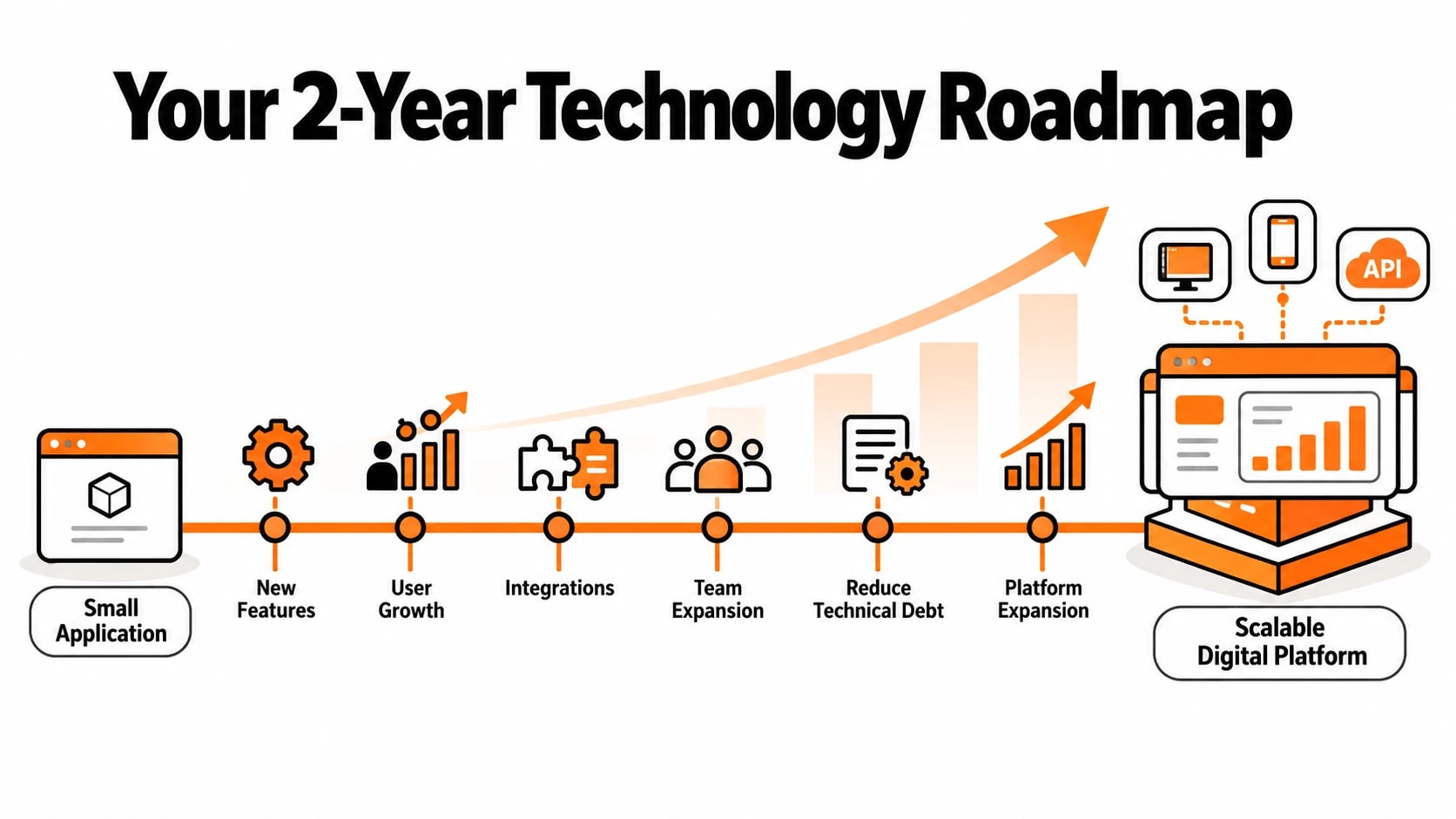
Most small businesses think about software in terms of the features they need right now. The ones that scale successfully think one or two years ahead, even while building for today. A technology roadmap does not need to be a rigid plan. It is a shared understanding of where the product is going and what technical decisions today will either support or obstruct that direction.
A practical technology roadmap for a small business covers several key areas:
- Feature milestones: What capabilities do you expect to add in the next six, twelve, and twenty-four months? This shapes architecture decisions like whether you need a plugin system, multi-tenancy, or API access from the start.
- User growth projections: Even rough numbers help. Going from one hundred to one thousand users is different from going from one thousand to one million, and your infrastructure choices should reflect that.
- Integration requirements: Will you need to connect to payment processors, CRMs, ERPs, or third-party data sources? Plan the integration layer before you need it.
- Team growth: As your development team grows, your codebase needs to support multiple contributors without chaos. This means documentation, clear module boundaries, and consistent coding standards.
- Technical debt budget: Every project accumulates shortcuts. Budgeting regular time to address technical debt prevents it from accumulating into something that blocks future progress.
- Platform expansion: If a mobile app, public API, or additional product line is on the horizon, your backend architecture should be built with those surfaces in mind from the start.
The goal of a roadmap is not to predict the future perfectly. It is to make sure that the decisions you make today do not become obstacles to the goals you have tomorrow. Revisiting the roadmap every quarter keeps your technical direction aligned with your business direction.
Conclusion
Building software that scales is not about spending more money or adding more complexity upfront. It is about making thoughtful decisions at each stage of development, choosing the right architecture for where you are going, not just where you are today, and working with partners who understand the difference between shipping fast and shipping smart. The businesses that scale successfully are the ones that treat their software as a long-term asset rather than a short-term fix.
If you are a small business ready to build software that will not need to be rebuilt in two years, the right time to start thinking about scalability is before you write the first line of code. Whether you are starting from scratch or untangling an existing system that has hit its limits, the team at Techlad helps businesses build software designed to grow with them. Reach out to talk through what your product needs and how to get there the right way.
Frequently Asked Questions
How much does it cost to build scalable software for a small business?
Costs vary widely depending on complexity, but scalable software does not always cost more upfront. Good architectural decisions and a focused feature set often cost less than rebuilding a poorly designed system later. Most small business web applications range from $15,000 to $100,000 depending on scope and requirements.
When should a small business start thinking about scalability?
Before development begins. The architectural decisions made in the first sprint have the longest-lasting impact. You do not need to over-engineer for scale you do not have yet, but you should avoid patterns that are known to break as usage grows, like tightly coupled monoliths with no separation of concerns.
What is the most common reason small business software fails to scale?
The most common reason is database design. Poorly structured schemas, missing indexes, and no query optimization create performance bottlenecks that become impossible to fix without major rewrites. The second most common reason is choosing a technology stack based on familiarity rather than fit for the product's growth requirements.
Should a small business use microservices from the start?
Generally, no. Microservices add significant operational complexity that is difficult to manage with a small team and limited infrastructure budget. A well-structured monolith with clean module separation is usually the better starting point, with services extracted later once the boundaries between different parts of the product are clearly understood.
How do I know if my existing software can be scaled or needs to be rebuilt?
A technical audit can answer this clearly. Key indicators that a rebuild is needed include spaghetti code with no clear architecture, a database that cannot be modified without breaking multiple features, and no test coverage. If the core data model is sound, incremental refactoring is usually faster and cheaper than starting over.