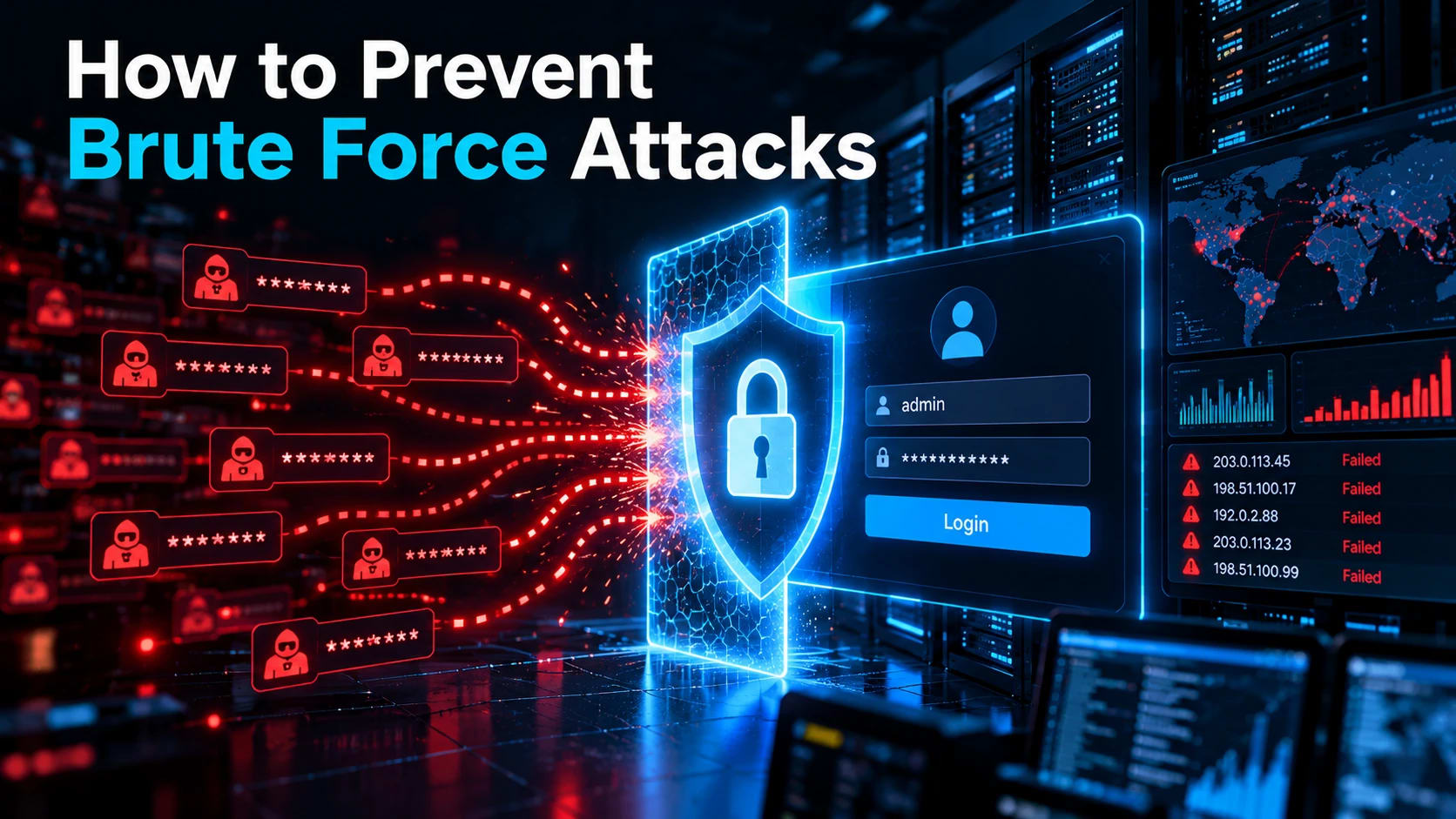
To prevent brute force attacks, require multi-factor authentication on every internet-facing login, rate-limit failed attempts by account, IP, and globally, block breached passwords, store hashes with Argon2id or bcrypt, and alert on abnormal login failures. Layer these controls, because no single one stops every variant.
Open any SSH server's auth log a few hours after it goes online, and you will see this:
Oct  3 02:14:07 web01 sshd[2231]: Failed password for root from 203.0.113.45 port 51022 ssh2
Oct  3 02:14:09 web01 sshd[2233]: Failed password for admin from 198.51.100.17 port 40318 ssh2
Oct  3 02:14:11 web01 sshd[2236]: Failed password for ubuntu from 192.0.2.88 port 33874 ssh2
Three usernames, three IPs, two seconds apart. Nobody is typing. Bots test every login page, SSH port, and API endpoint they find, and a single successful guess leads straight to account takeover. Below are nine controls ranked by impact, plus how to detect and respond to an attack in progress.
How to Prevent Brute Force Attacks: 9 Controls Ranked by Impact
Enforce multi-factor authentication. A correct guess or leaked password no longer grants access.
Rate limit and throttle logins. Slow guessing to a speed that makes it pointless.
Follow NIST SP 800-63B password rules. Favor length, block breached passwords, drop forced rotation.
Hash passwords with Argon2id or bcrypt. A stolen database should not become a cracked one.
Add CAPTCHA and bot detection selectively. Challenge suspicious traffic only.
Harden SSH, RDP, CMS logins, and APIs. Close the services attackers hit first.
Use IP reputation, geo rules, and a WAF. Cut known bad traffic early.
Monitor and alert on authentication failures. Catch what slips past prevention.
Test your own defenses. Confirm the controls work before an attacker does.
Short on time? Do controls 1, 2, and 8 first. MFA limits the damage, rate limiting slows the attack, and monitoring tells you it is happening.
Why Prevention Differs by Variant
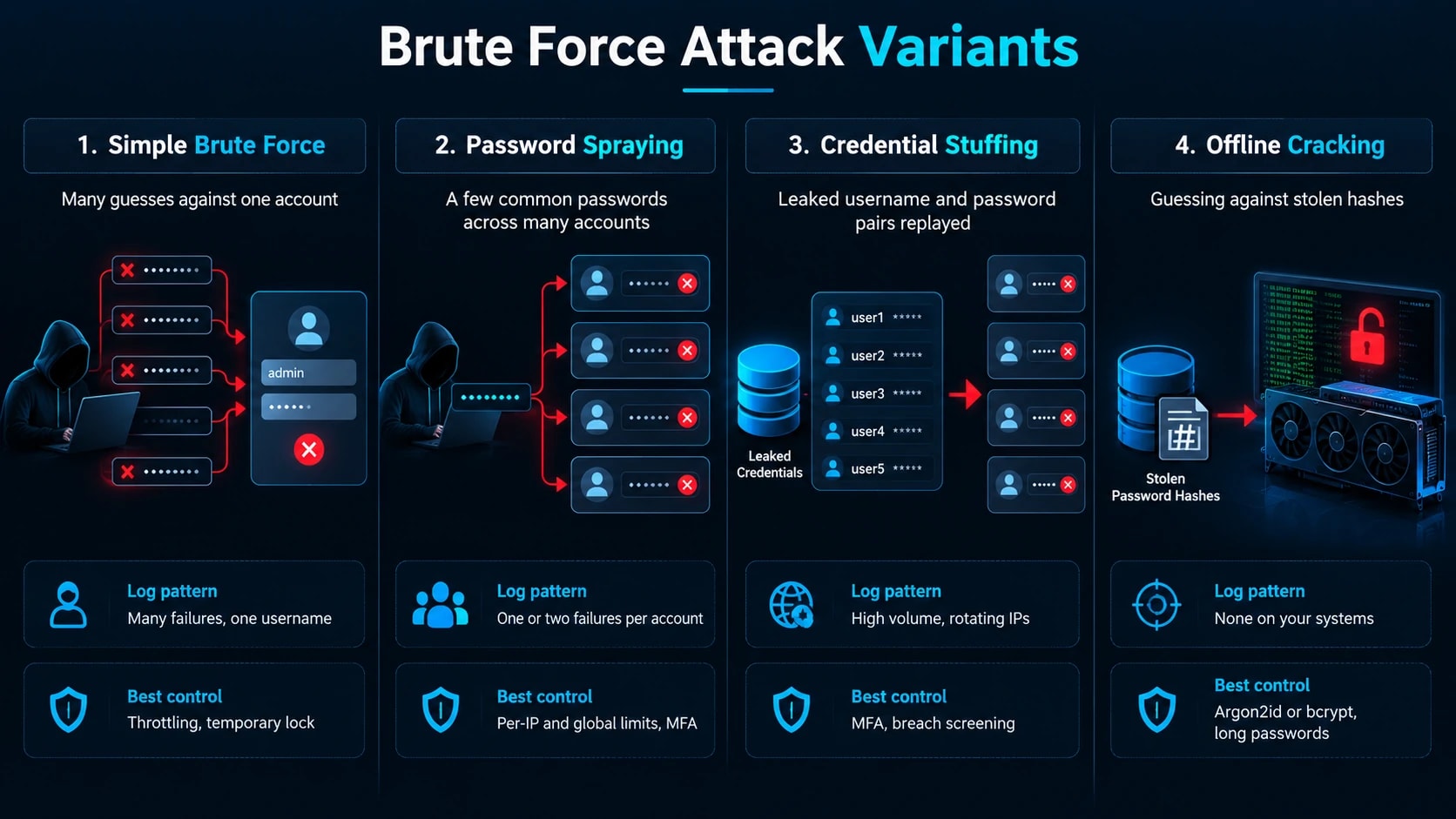
Each variant is stopped by a different control, so know which one you face.
Variant | How it works | Log signature | Best control |
|---|---|---|---|
Simple brute force | Many guesses against one account | Many failures, one username | Throttling, temporary lock |
Password spraying | A few common passwords across many accounts | One or two failures per account | Per-IP and global limits, MFA |
Credential stuffing | Leaked username and password pairs replayed | High volume, rotating IPs | MFA, breach screening |
Offline cracking | Guessing against stolen hashes | None on your systems | Argon2id or bcrypt, long passwords |
Spraying defeats per-account lockouts because each account sees almost no failures. Offline cracking leaves no trace at all, which is why hashing matters even if your login page is perfect.
Control 1: Enforce Multi-Factor Authentication
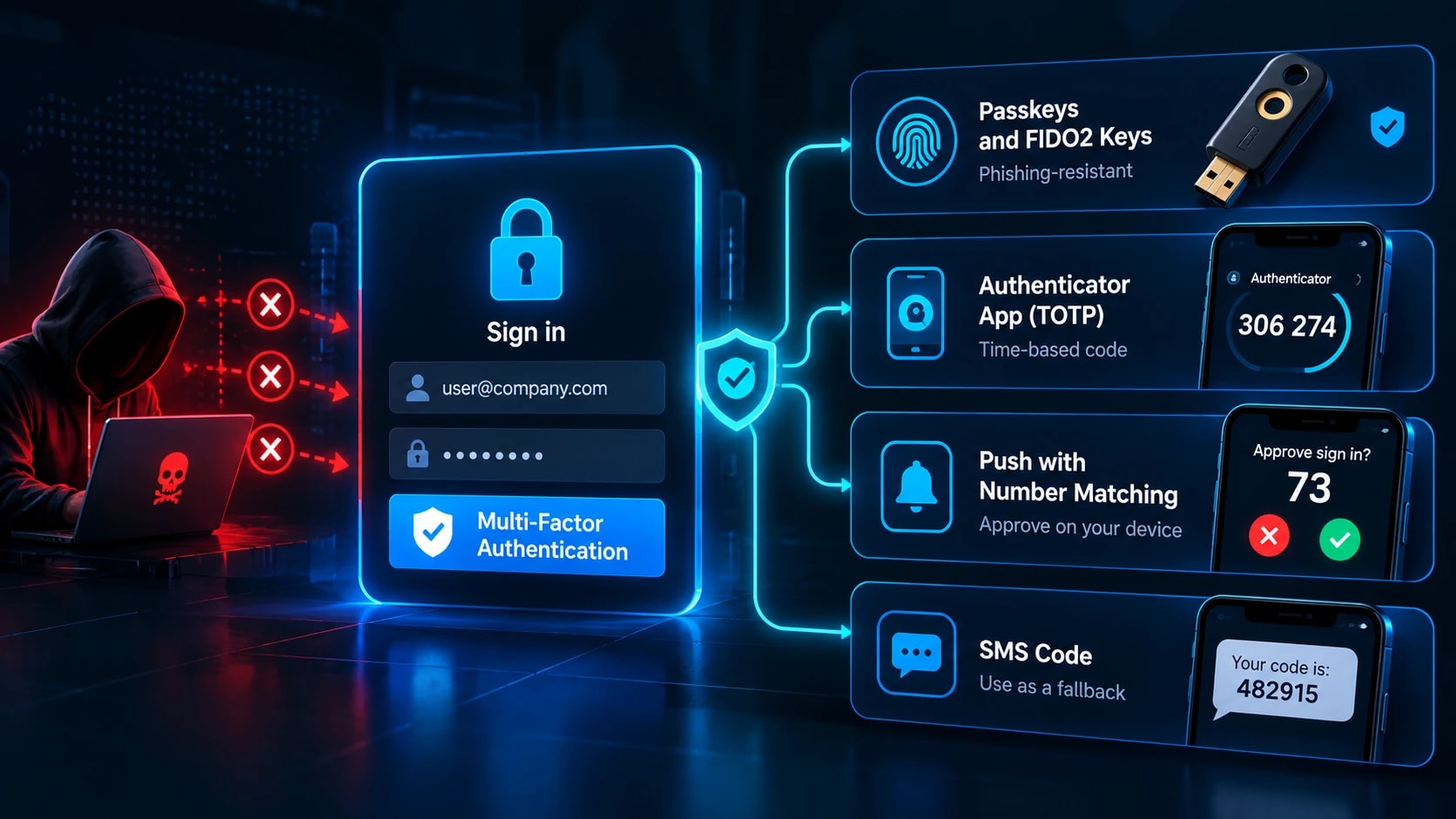
MFA ranks first because it makes a correct password insufficient. Ranked by strength:
Passkeys and FIDO2 keys. Phishing-resistant because the credential is bound to the real domain.
Authenticator app TOTP. Solid, though a live phishing proxy can relay the code.
Push with number matching. Blocks blind approvals.
SMS codes. Weakest, exposed to SIM swapping. Use as a fallback only.
Counter MFA fatigue, where attackers spam push prompts until someone approves, with number matching, a cap on prompts per hour, and alerts after repeated denials. Roll out by blast radius: admin panels and cloud consoles, then email, VPN, and code hosting, then everyone else. Lock down the recovery path too. Never let support disable MFA over email alone.
Control 2: Rate Limit and Throttle Login Attempts
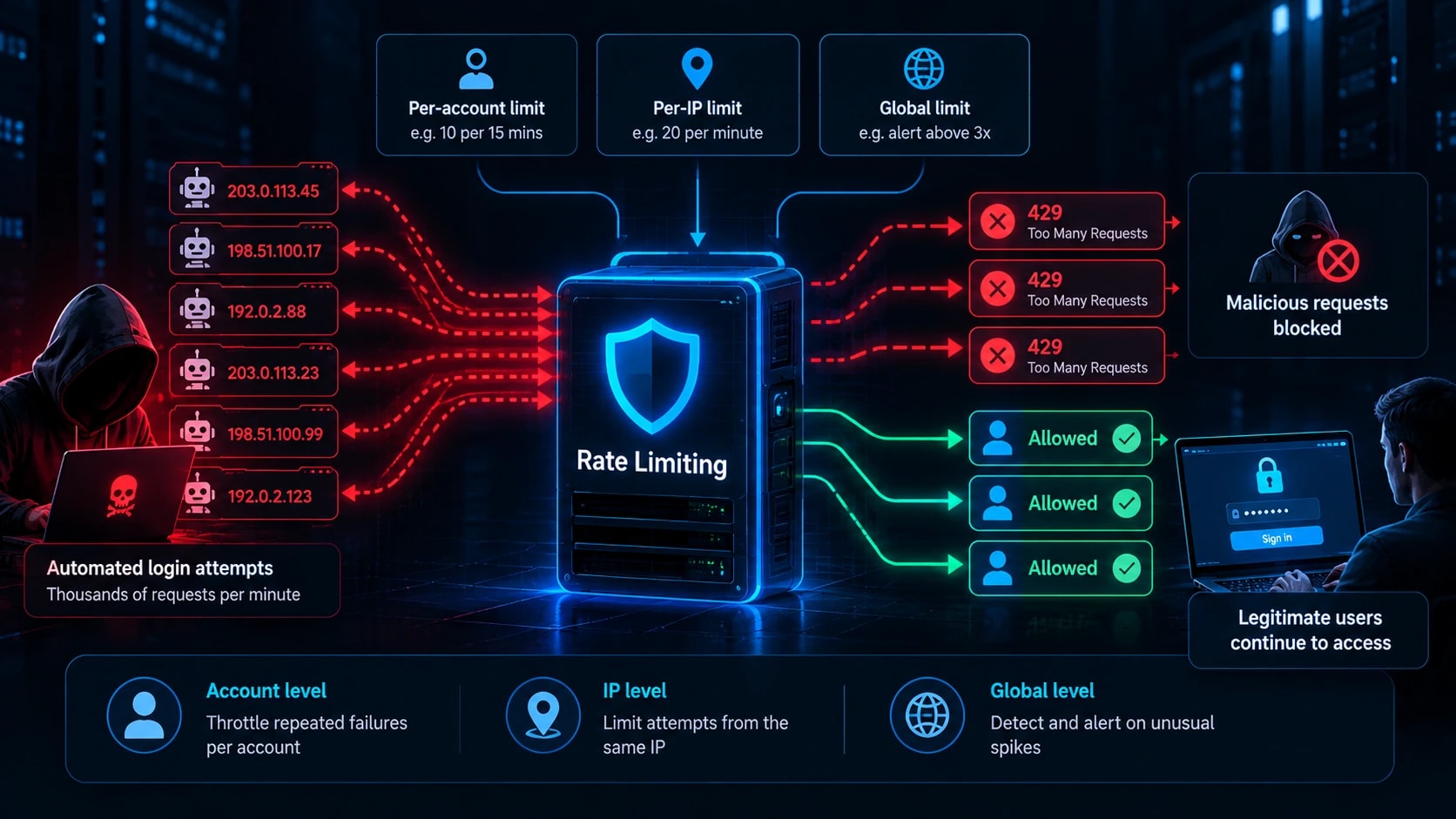
A bot trying 10,000 passwords a minute is a threat. Held to 5 per minute, it is not. Throttle before you lock, because hard lockouts let attackers deny service to real users.
Failures 1 to 3: no delay
Failures 4 onward: 1, 2, 4, 8 seconds, capped at 60
After 10 failures: 15-minute lock plus an email to the account owner
Limit on three dimensions, since each variant slips past a different one: per account (10 failures per 15 minutes), per IP (20 attempts per minute), and global (alert above 3x baseline failures).
nginx
limit_req_zone $binary_remote_addr zone=login:10m rate=5r/m;

location /login {
    limit_req zone=login burst=3 nodelay;
    limit_req_status 429;
    proxy_pass http://app_backend;
}
Nginx only sees IPs, so use Redis counters or a WAF for the account and global layers. Apply the same limits to password reset, MFA entry (a 6-digit code has only 1,000,000 combinations), and API login routes.
Control 3: Set Password Rules Based on NIST SP 800-63B
NIST replaced old complexity rules with guidance built on how attackers guess.
Require 8 characters minimum with MFA and 15 or more for admin accounts. Allow 64 or more.
Drop forced mixes of symbols and numbers.
correct horse battery staplebeatsP@ssw0rd!.Check new passwords against the Have I Been Pwned Pwned Passwords API, which uses k-anonymity so the full password never leaves your system.
End scheduled rotation. Force a reset only on evidence of compromise, such as a match found through dark web monitoring.
Allow paste so password managers work.
If an auditor still demands rotation, document the NIST rationale and apply the stricter rule only where a framework requires it.
Control 4: Hash Passwords to Stop Offline Attacks
Rate limits do nothing once an attacker holds your database. A modern GPU tests billions of MD5 guesses per second, so fast hashes fall in hours. This is where understanding how hashing works pays off. Use a slow, memory-hard algorithm:
Argon2id. The current OWASP recommendation.
scrypt. Strong alternative.
bcrypt. Battle-tested, cost factor 12 or higher.
PBKDF2. Only where compliance requires it, at 600,000 or more iterations.
Never use MD5, SHA-1, or SHA-256 alone. Libraries handle salting, so never write it yourself. Tune the work factor to roughly 250 to 500 ms per hash and re-hash at next login when settings improve.
python
from argon2 import PasswordHasher
ph = PasswordHasher(time_cost=2, memory_cost=19456, parallelism=1)
stored = ph.hash(password)
ph.verify(stored, password)  # raises on mismatch
Confirm parameters against the current OWASP Password Storage Cheat Sheet before shipping.
Control 5: Add CAPTCHA and Bot Detection Selectively
CAPTCHA adds friction, not a wall. Solver services sell human-solved challenges cheaply, and AI models now beat many image puzzles. Trigger challenges on risk: three or more failures, a new device or country, hosting provider IPs, or headless browser signatures. Cloudflare Turnstile, hCaptcha, and reCAPTCHA v3 score risk invisibly. Pair them with device fingerprinting and timing analysis, and offer an accessible alternative for users who cannot complete visual challenges.
Control 6: Harden the Services Attackers Hit Most
SSH. Remove the password and brute force has nothing to guess.
PasswordAuthentication no
PermitRootLogin no
AllowUsers deploy admin
MaxAuthTries 3
Generate keys withssh-keygen -t ed25519, confirm key login in a second session, then reload sshd. Add Fail2ban as a supporting layer. Changing the port reduces log noise but is not a control.
RDP. Never expose port 3389. Put it behind a VPN or gateway (see how ZTNA and VPN fit modern security strategies), enable Network Level Authentication, require MFA, and set a lockout policy of 5 failures for 15 minutes.
WordPress and CMS. Limit login attempts, block /xmlrpc.php (its system.multicall method tests hundreds of passwords per request), restrict /wp-login.php by IP, and enforce admin MFA.
APIs. Set per-key and per-IP limits with 429 responses, use 332-byteor longer random keys, expire tokens within an hour, and return identical errors for wrong usernames and wrong passwords.
Control 7: Use IP Reputation, Geo Rules, and a WAF
Edge filtering is a pre-filter, not a primary defense. Pull in reputation feeds such as AbuseIPDB and Spamhaus DROP, challenge hosting provider ranges and Tor exit nodes on login routes, and apply geo rules where your customers are concentrated. Use step-up MFA instead of hard blocks so travelers are not locked out. Deploy rate-based WAF rules (Cloudflare, AWS WAF, or ModSecurity), starting in count mode before switching to block. Residential proxy networks rotate real home IPs and evade all of this, so MFA and per-account throttling still carry the load.
Control 8: Monitor and Alert on Authentication Failures
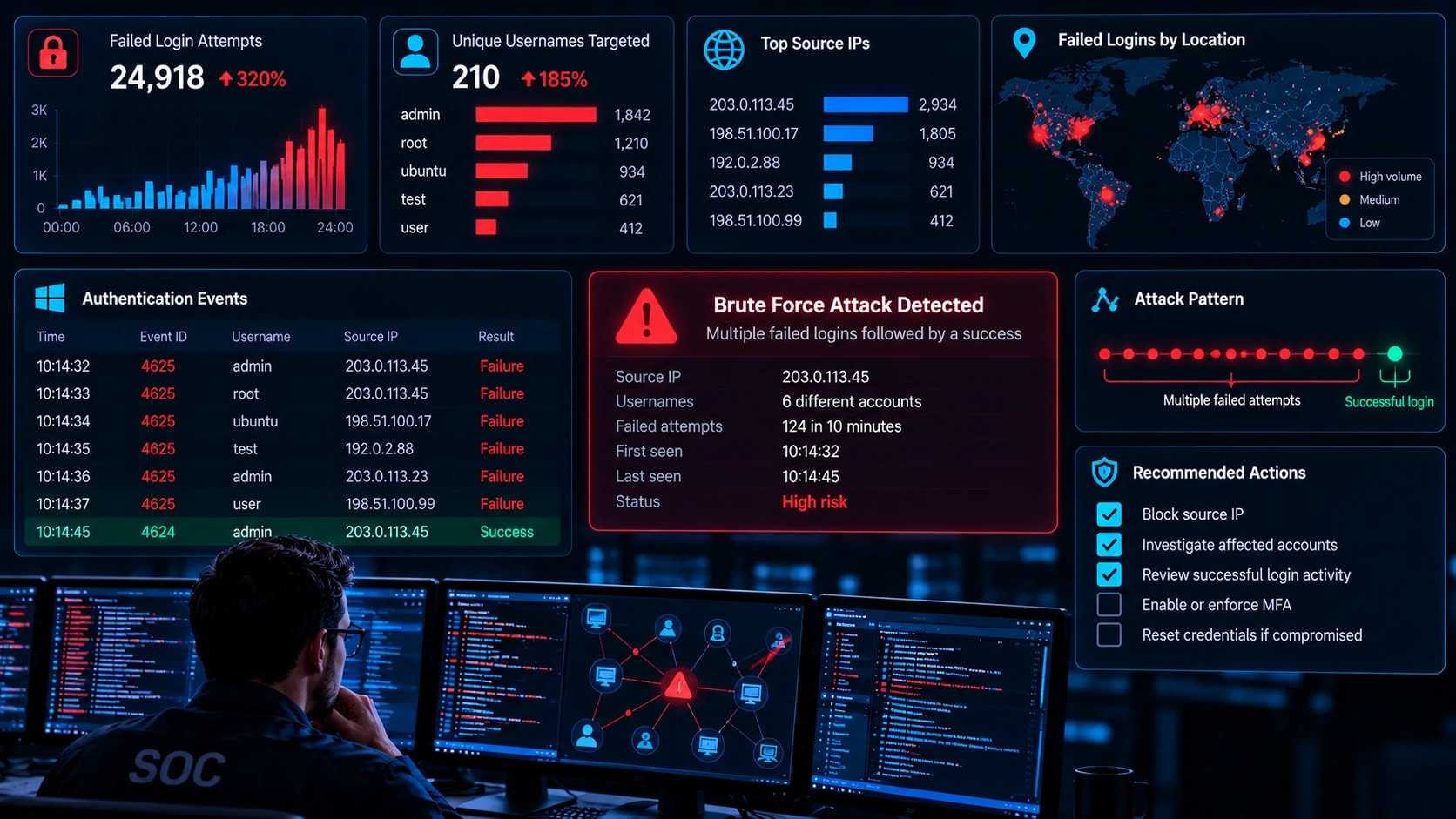
Prevention fails eventually, and without monitoring a successful brute force login looks normal. Good cyber security monitoring starts with the right logs: Windows Event IDs 4625, 4624, and 4740; SSH auth.log401 spikes on web logins, and identity provider sign-in logs. Never log passwords.
Write one detection per variant:
Brute force: more than 10 failures for one account in 5 minutes
Spraying: one IP failing against more than 15 usernames in 30 minutes
Stuffing: login volume above 3x baseline with a high failure ratio
Compromise: a successful login after a failure burst. Page someone for this one.
MFA abuse: three or more denied push prompts
index=wineventlog EventCode=4625
| bin _time span=30m
| stats dc(TargetUserName) as users by _time, IpAddress
| where users > 15
Wazuh is a free starting point with built-in SSH and brute force rules. Run alerts in report-only mode for a week and tune against your own baseline.
Control 9: Test Your Own Defenses
An untested control is an assumption. Test only systems you own or have written authorization to test, using a dedicated test account. Hydra, Medusa, and Burp Intruder cover login forms and services, and Hashcat tests offline resistance against a copy of your own hashes in a lab. Folding this into a broader penetration testing and vulnerability assessment program keeps it on a schedule.
Verify that 15 rapid failures trigger delays, one password across 30 accounts trips spray detection, a correct password without MFA is denied, SSH rejects passwords, and a failure burst followed by success reaches your pager. The alert test matters as much as the block test. Retest quarterly and after any authentication change.
What to Do During an Active Attack
Confirm scope. Identify targeted accounts, source IPs, and any success after a failure burst.
Block the source. Use firewall or WAF rules, or block by ASN or request pattern if IPs rotate. Switch count-mode rules to block.
Lock down compromised accounts. Reset passwords, revoke sessions, and verify MFA ownership through another channel.
Tighten temporarily. Lower thresholds and require MFA step-up, then remove the measures after the attack.
Hunt post-compromise activity. Look for new MFA devices, mailbox forwarding rules, API keys, and OAuth grants.
Document. Record which control should have stopped this and fix the gap. Check breach notification deadlines if data was accessed.
Brute Force Prevention Checklist
Do today
List every internet-facing login
Enable MFA on admin, email, and cloud accounts
Disable SSH passwords and close public RDP
Do this week
Add login, reset, and MFA endpoint rate limits
Screen passwords against breach lists
Set alerts for success after failure bursts
Do this quarter
Run an authorized test against every control
Tune alert thresholds
Re-benchmark hash work factors
Bottom Line
Brute force attacks are automated and constant, so defense must be automatic too. Prioritize MFA, layered rate limiting, strong hashing with breach screening, and alerts on success after failure. Together they raise the cost of attacking you past what most bots will spend.
Next step today: list every internet-facing login and mark which ones lack MFA and rate limiting. Fix admin panels, email, and remote access first.
Frequently Asked Questions
What is the most effective way to prevent brute force attacks?
Phishing-resistant MFA such as passkeys or FIDO2 keys. It makes a correct password insufficient, which neutralizes guessing, stuffing, and phished credentials together. Pair it with rate limiting.
Does account lockout stop brute force attacks?
It stops single-account guessing, but attackers can trigger lockouts to block real users, and it does nothing against password spraying. Use progressive delays plus per-IP and global limits.
How long does it take to brute force a password?
It depends on length, character set, and hash type. Length matters most, and fast hashes like MD5 fall far quicker than Argon2id. Test your own hashes in a lab rather than trusting a generic figure.
Can a VPN or changing the default port stop brute force attacks?
A VPN removes public exposure, so attackers must pass its authentication first. Changing the port only cuts scanner noise and is found in minutes.
What is the difference between brute force and credential stuffing?
Brute force guesses passwords. Credential stuffing replays real leaked pairs, betting on reuse. Unique passwords, breach screening, and MFA stop stuffing.
How do I know if I am being brute forced?
Look for failed login spikes, one IP failing across many usernames, one password tried across many accounts, and lockout floods. A success right after a failure burst is the most serious sign.
Is Fail2ban enough to protect SSH?
No. Distributed attacks stay under its thresholds. Disable password authentication and require keys, and keep Fail2ban as a supporting layer.