
GSOC security means Global Security Operations Center security. It is a centralized security function that monitors threats, analyzes incidents, coordinates response, and protects people, assets, facilities, executives, travelers, and business operations across multiple locations.
GSOC security usually refers to the Global Security Operations Center, not Google Summer of Code. In a business security context, GSOC security refers to the people, processes, and technologies you use to monitor threats, respond to incidents, and protect your organization across locations, regions, and time zones.
A Global Security Operations Center acts as your central security command center.
It helps you see what’s happening across your business, from cyber alerts and access control events to CCTV monitoring, travel risk, civil unrest, severe weather, workplace incidents, and executive protection concerns.
This matters because modern security risks no longer fit into one department. A cyberattack can affect physical operations. A facility breach can trigger data security concerns.
A natural disaster can disrupt employees, supply chains, and customer service. A traveling executive may need real-time support during a crisis.
A GSOC gives you one place to collect information, verify threats, coordinate action, and keep leaders informed.
For business owners, CISOs, security managers, enterprise risk teams, and managed security service buyers, understanding GSOC security helps you decide whether you need an in-house GSOC, managed GSOC services, or GSOC as a service.
What Is GSOC Security?
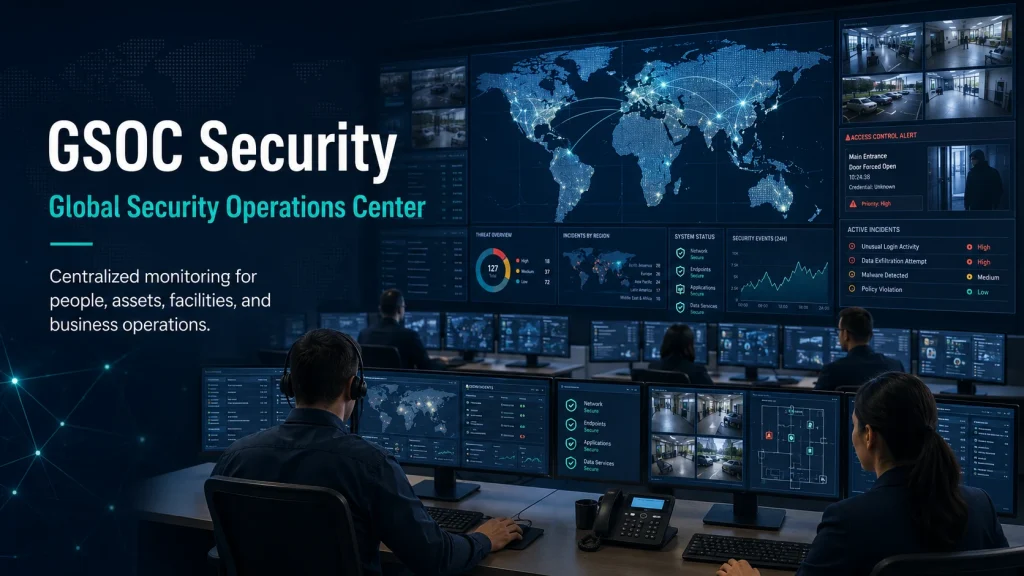
GSOC security is the centralized management of security monitoring, risk intelligence, incident response, and crisis coordination through a Global Security Operations Center.
The GSOC’s meaning in security is simple: it is a central hub that watches over your organization’s people, facilities, assets, travelers, executives, and operations.
It collects data from different security sources, identifies potential threats, verifies incidents, and coordinates the right response.
A GSOC can support both physical and cyber risk, depending on how your organization designs it. Some GSOCs focus on corporate security, executive protection, CCTV monitoring, access control monitoring, travel risk management, and emergency response.
Others connect with cybersecurity operations centers, IT teams, business continuity teams, and enterprise risk teams.
A mature GSOC often supports:
- Threat monitoring
- Physical security operations
- Cybersecurity coordination
- Access control monitoring
- CCTV and video review
- Incident response
- Crisis management
- Travel risk management
- Executive protection support
- Business continuity support
- Security intelligence and reporting
Think of a GSOC as your organization’s security nerve center. It does not replace every security team. Instead, it connects them. It helps your teams avoid working in silos, respond faster, and make better decisions with better context.
Industry descriptions often define a GSOC as a centralized function for monitoring, detecting, and responding to security incidents and threats, with real-time situational awareness across people, assets, and operations.
GSOC Security Meaning: Global Security Operations Center vs Google Summer of Code
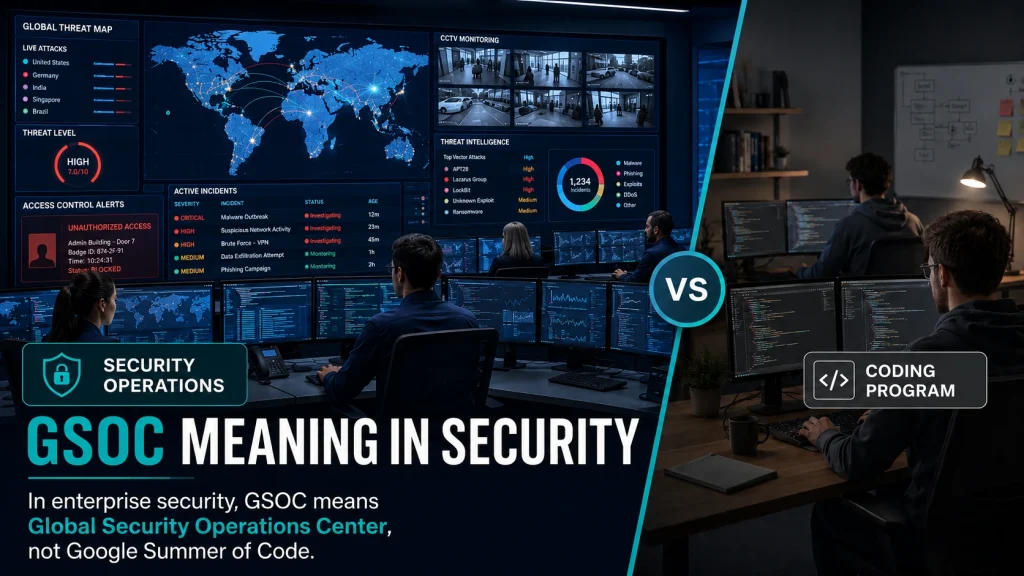
The keyword “GSOC security” can be confusing because “GSOC” can mean different things in different contexts.
In technology and open-source communities, GSoC often refers to Google Summer of Code, a program related to open-source software development. That is not what this article covers.
In enterprise security, GSOC means Global Security Operations Center. This article focuses on that meaning: a security monitoring center used by businesses to protect people, facilities, executives, travelers, data, and operations.
Here’s the simple distinction:
| Term | Meaning | Context | Relevance to This Article |
|---|---|---|---|
| GSOC security | Global Security Operations Center security | Corporate security, enterprise security, risk management | Yes |
| GSoC | Google Summer of Code | Open-source software development | No |
| SOC | Security Operations Center | Cybersecurity operations | Related |
| NOC | Network Operations Center | IT network operations | Related |
So, when you search what GSOC security is, the practical answer is this: it is a centralized enterprise security function that monitors risk, coordinates response, and supports business continuity across locations.
Why GSOC Security Matters for Modern Businesses
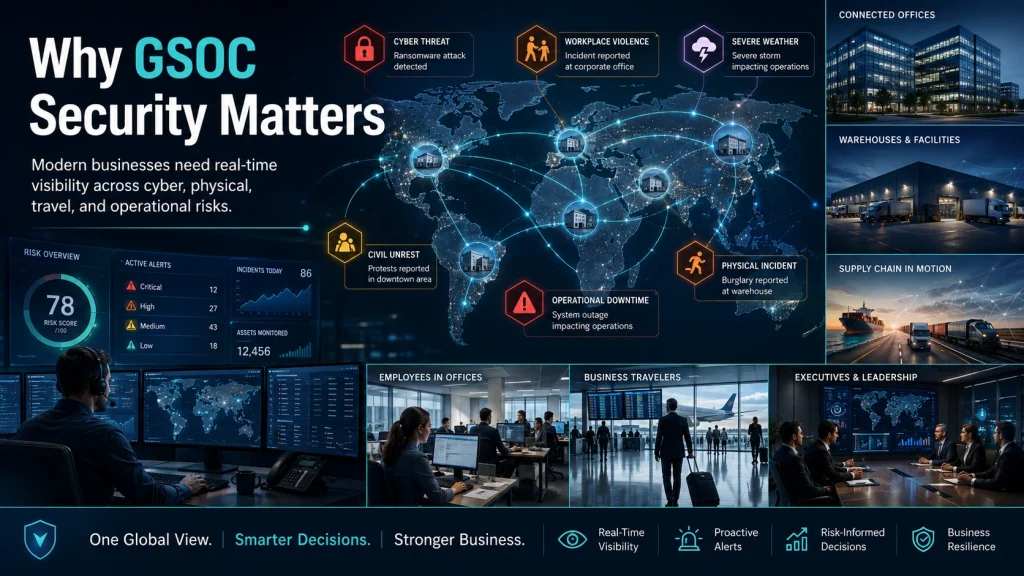
You face a wider risk environment than businesses faced even a decade ago. Your organization may have offices in multiple cities, remote employees, traveling executives, cloud systems, third-party vendors, warehouses, retail sites, data centers, and global supply chains.
Each of those areas creates risk.
A GSOC helps you manage those risks from one central point. This is important because many incidents move fast. A protest near one office can affect employee safety.
A failed access attempt at a sensitive facility can indicate a larger threat. A cyber incident can disrupt building systems, production lines, or logistics platforms. Severe weather can affect travel, operations, and employee well-being.
Common risks that GSOC security helps monitor include:
- Cyber threats
- Unauthorized facility access
- Insider threats
- Workplace violence
- Travel disruption
- Civil unrest
- Supply chain disruption
- Natural disasters
- Executive safety concerns
- Retail theft or warehouse incidents
- Building system alarms
- Operational downtime
- Health and safety emergencies
The value of a Global Security Operations Center is not just that it collects alerts. The value comes from turning scattered signals into useful action.
For example, your access control system may show repeated failed badge attempts at a facility. Your CCTV system may show an unknown person near a restricted entrance.
Your local security officer may report suspicious behavior. Your cyber team may also detect attempted access to internal systems from that location.
Individually, each alert may seem small. Together, they may reveal a coordinated security incident.
That’s where GSOC security becomes useful. It connects physical security, cybersecurity, corporate security, risk intelligence, and emergency response.
ASIS describes security convergence as closing the gap between traditionally separate functions such as cybersecurity and site security, which reflects the direction many mature security programs are moving toward.
How a Global Security Operations Center Works
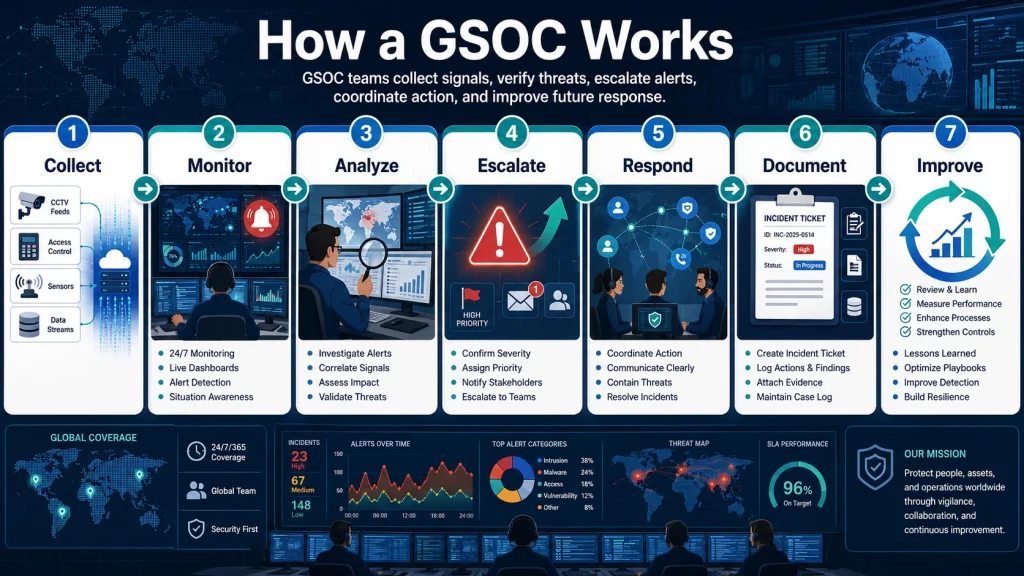
A Global Security Operations Center works by collecting security data, monitoring threats, verifying incidents, escalating alerts, coordinating response, documenting activity, and improving future decisions.
The exact workflow depends on your organization, but most GSOC security programs follow a clear operating model.
1. Collect Security Data
Your GSOC first collects data from internal and external sources. This can include CCTV, access control systems, visitor management tools, SIEM alerts, threat intelligence feeds, employee travel systems, weather alerts, social media monitoring, emergency notifications, and reports from field teams.
The goal is to bring important security signals into one place.
2. Monitor Threats in Real Time
GSOC analysts monitor live dashboards, alert queues, news feeds, maps, cameras, and intelligence sources. They look for signs that something may affect your people, facilities, operations, or brand.
Real-time threat monitoring may include:
- Suspicious access attempts
- Security alarms
- Camera analytics alerts
- Regional unrest near offices
- Severe weather near facilities
- Travel disruption near employees
- Cyber alerts from connected systems
- Executive protection concerns
3. Analyze and Verify Incidents
Not every alert is a real incident. A door alarm may come from an employee holding a door open. A camera alert may come from an animal, a lighting issue, or routine activity. A news alert may not affect your actual location.
Your GSOC must verify what’s happening before escalating.
Analysts review context, check camera feeds, compare data sources, contact local teams, and determine whether the event needs action.
4. Escalate Alerts
Once an event is verified, the GSOC follows an escalation process. This tells analysts who to contact, how fast to contact them, what information to provide, and what actions to trigger.
Escalation may involve:
- Facility security
- IT security
- Corporate security
- Executive protection
- Legal
- HR
- Crisis management teams
- Local law enforcement
- Emergency medical services
- Business continuity leaders
- Senior executives
5. Coordinate Response
The GSOC does not always “solve” the incident by itself. Its job is often to coordinate the right response.
For example, if a facility access breach occurs, the GSOC may alert onsite guards, review CCTV footage, lock or unlock doors, contact facility leadership, document the event, and notify cyber teams if systems or badges may be compromised.
6. Document Incidents
A strong GSOC documents what happened, when it happened, who was involved, what actions were taken, and what the outcome was.
This supports:
- Investigations
- Compliance reporting
- Insurance claims
- Legal review
- Post-incident analysis
- Training improvements
- Executive reporting
7. Improve Future Security Decisions
After an incident, the GSOC reviews lessons learned. This helps you refine playbooks, reduce false positives, improve escalation paths, adjust staffing, update technology, and strengthen business continuity planning.
A good GSOC security program gets better over time.
GSOC vs SOC: What Is the Difference?
The main difference between GSOC and SOC is scope. A GSOC focuses on global enterprise security across people, facilities, assets, travel, executives, and operations. A SOC usually focuses on cybersecurity detection and response across networks, endpoints, cloud systems, identities, and applications.
A SOC improves cybersecurity detection, response, and prevention by coordinating cyber tools and operations, while a GSOC has a broader enterprise security role that may include physical security and corporate risk.
GSOC vs SOC Comparison Table
| Category | GSOC | SOC |
|---|---|---|
| Full name | Global Security Operations Center | Security Operations Center |
| Primary purpose | Protect people, facilities, assets, travelers, executives, and business operations. | Protect digital systems, networks, endpoints, identities, and data |
| Scope | Enterprise security, corporate security, physical security, travel risk, crisis management, and sometimes cyber coordination | Cybersecurity operations |
| Threats monitored | Physical incidents, access events, CCTV alerts, civil unrest, travel risk, natural disasters, executive threats, business disruption | Malware, phishing, ransomware, suspicious logins, endpoint alerts, cloud threats, network attacks |
| Teams involved | Corporate security, physical security, executive protection, facilities, HR, legal, business continuity, cyber teams | Cybersecurity analysts, incident responders, threat hunters, IT operations, and compliance teams |
| Common tools | Access control, VMS, CCTV analytics, threat intelligence, mass notification, case management, GIS dashboards | SIEM, EDR, XDR, SOAR, IDS, firewalls, cloud security tools |
| Typical use cases | Facility breach response, travel risk alerts, executive protection support, crisis management, emergency response | Malware investigation, phishing response, account compromise, ransomware detection |
| Best fit | Organizations with distributed people, sites, assets, executives, and operational risk | Organizations needing cyber threat detection and response |
The two functions should not compete. In many organizations, they work together. When cyber and physical security overlap, a GSOC and SOC can share context and coordinate response.
GSOC vs NOC: What Is the Difference?
A GSOC focuses on security risk. A NOC, or Network Operations Center, focuses on network performance, uptime, connectivity, and IT infrastructure availability.
A NOC asks, “Is the network working?”
A GSOC asks, “Are our people, assets, facilities, and operations safe?”
GSOC vs NOC Comparison Table
| Category | GSOC | NOC |
|---|---|---|
| Full name | Global Security Operations Center | Network Operations Center |
| Primary focus | Security, risk, safety, incident response, crisis coordination | Network uptime, performance, connectivity, and infrastructure health |
| Main goal | Protect people, assets, facilities, executives, travelers, and business operations. | Keep networks, servers, systems, and connectivity running |
| Alerts monitored | Security alarms, access events, CCTV alerts, threat intelligence, travel risk, emergency events | Network outages, latency, bandwidth issues, device failures, system health alerts |
| Teams involved | Corporate security, physical security, cyber teams, risk, facilities, executive protection, crisis teams | Network engineers, IT operations, infrastructure teams, service desk |
| Tools used | Access control systems, VMS, threat intelligence, GIS, mass notification, case management | Network monitoring, observability platforms, ticketing systems, and infrastructure dashboards |
| Example incident | Unauthorized person enters restricted facility | Router failure causes office connectivity outage |
| Overlap | May coordinate with IT during cyber or infrastructure-related security incidents | May alert security if outages appear suspicious |
Your business may need both. A NOC keeps your infrastructure available. A GSOC helps protect the enterprise from security and safety risks.
Core Functions of GSOC Security
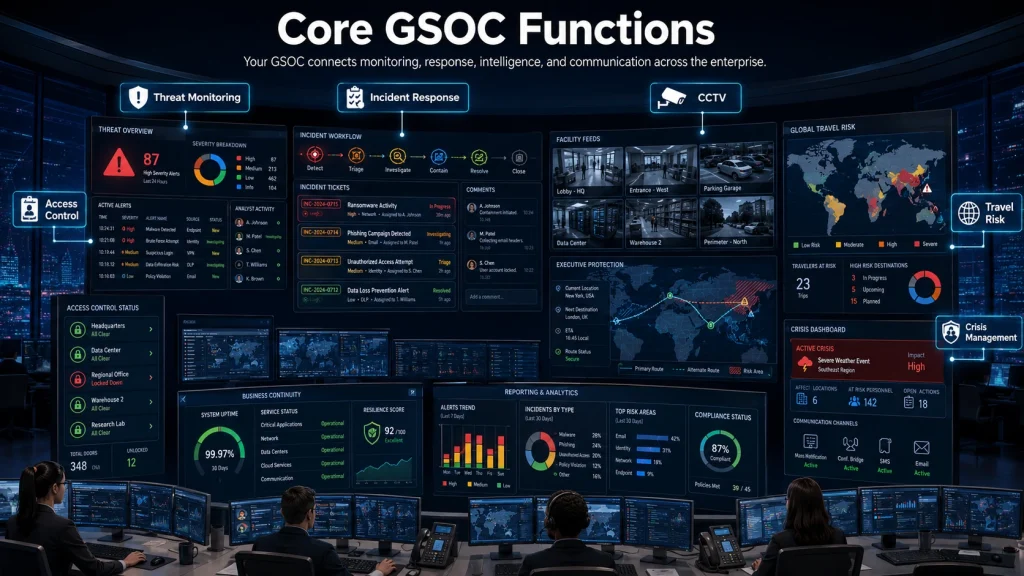
GSOC security includes several connected functions. Some organizations use all of them. Others start with a smaller scope and expand as risk grows.
Threat Monitoring
Threat monitoring is one of the main responsibilities of a GSOC. Analysts track events that could affect your organization, including local security incidents, cyber alerts, civil unrest, weather events, health emergencies, supply chain disruption, and geopolitical developments.
Threat monitoring helps you act before an incident becomes a crisis.
For example, if unrest develops near one of your offices, the GSOC can alert local managers, recommend remote work, notify travelers, increase guard coverage, and brief leadership.
Incident Response
Incident response is the process of handling security events once they happen. A GSOC supports incident response by verifying alerts, contacting the right teams, coordinating action, and documenting the event.
A practical incident response workflow includes:
- Detect the event
- Verify the facts
- Classify severity
- Escalate to the right owner
- Coordinate response
- Track actions
- Communicate updates
- Close and review the incident
This gives your teams a repeatable process instead of a rushed reaction.
Access Control Monitoring
Access control monitoring helps you detect unauthorized entry, badge misuse, forced doors, tailgating, door-held-open alerts, and suspicious access patterns.
A GSOC may monitor:
- Failed badge attempts
- After-hours access
- Access to sensitive areas
- Visitor access
- Contractor access
- Badge activity during terminations
- Emergency lockdown events
This is important because physical access can affect cybersecurity, employee safety, intellectual property, and regulatory risk.
CCTV and Surveillance Monitoring
CCTV monitoring gives the GSOC visual context. Analysts can review camera feeds, validate alarms, support investigations, and provide live updates during incidents.
Modern video management systems may include analytics for motion, object detection, crowding, perimeter breaches, and unusual behavior. These tools can help, but they still need human review. Without context, video analytics can generate false positives.
Travel Risk Management
Travel risk management is a common GSOC function for companies with employees, executives, sales teams, consultants, or field workers who travel.
A GSOC can monitor:
- Destination risk
- Flight disruption
- Civil unrest
- Severe weather
- Health alerts
- Security incidents near hotels or offices
- Traveler check-ins
- Emergency assistance requests
This helps you meet duty of care expectations and protect employees away from the office.
Executive Protection Support
Executives can face unique risks due to visibility, wealth, public decisions, layoffs, litigation, activism, or geopolitical issues.
A GSOC can support executive protection by providing:
- Threat intelligence
- Route monitoring
- Travel briefings
- Emergency communications
- Real-time incident support
- Location-based alerts
- Coordination with protection teams
This does not replace close protection professionals. It supports them with better intelligence and coordination.
Crisis Management
During a crisis, confusion creates risk. A GSOC helps centralize information and coordinate a response.
Crisis management support may include:
- Activating response teams
- Sending emergency alerts
- Tracking employee status
- Monitoring affected sites
- Coordinating with local responders
- Maintaining event logs
- Briefing executives
- Supporting recovery operations
A GSOC becomes especially valuable when multiple teams need the same trusted information.
Business Continuity Support
Business continuity focuses on keeping critical operations running during disruption. GSOC security supports this by identifying risks early and helping teams coordinate.
For example, if flooding threatens a warehouse, the GSOC can alert logistics leaders, monitor weather, coordinate site closure, notify employees, and track operational impact.
Security Intelligence and Reporting
Security intelligence turns raw information into useful insight. A GSOC can produce daily briefs, incident summaries, executive reports, trend analysis, travel advisories, facility risk reports, and post-incident reviews.
Good reporting helps you see patterns, not just isolated events.
Technologies Used in a GSOC
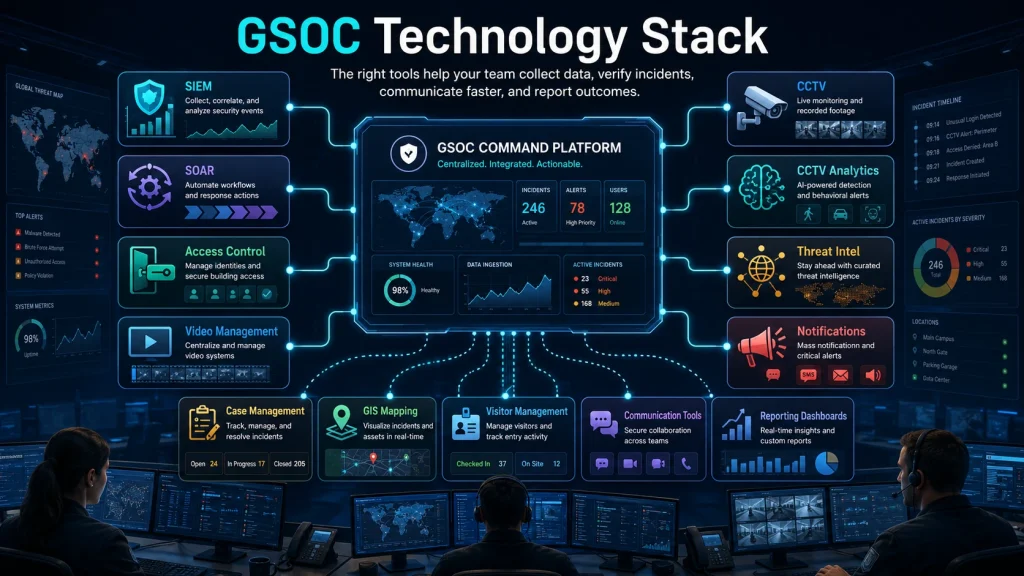
A GSOC depends on people and process first, but technology makes the work faster and more consistent. The right tools help analysts collect data, verify incidents, communicate, and report outcomes.
Common GSOC technologies include:
SIEM
A Security Information and Event Management platform collects and analyzes security logs. In a GSOC context, SIEM data may help connect cyber alerts with physical or operational risk.
SOAR
Security Orchestration, Automation, and Response tools help automate repetitive response actions. They can support playbooks, ticket creation, enrichment, and escalation workflows.
Access Control Systems
These systems manage and monitor entry to buildings, floors, rooms, labs, warehouses, and restricted areas. They are central to physical security operations.
Video Management Systems
A video management system, or VMS, helps your team view, record, search, and manage CCTV footage.
CCTV Analytics
CCTV analytics can detect motion, intrusion, crowding, object removal, loitering, or perimeter activity. These tools help analysts focus attention, but they must be tuned to reduce noise.
Threat Intelligence Platforms
Threat intelligence platforms help you monitor external risks, including cyber threats, geopolitical developments, civil unrest, crime trends, weather events, and location-based threats.
Mass Notification Systems
Mass notification tools let you send alerts to employees, executives, travelers, site leaders, and crisis teams through SMS, email, mobile app, phone, or other channels.
Case Management Tools
Case management tools help your GSOC document incidents, assign owners, track actions, attach evidence, and create reports.
GIS and Location Intelligence
GIS tools help map threats against your offices, warehouses, travelers, executives, supply chain routes, and customer-facing locations.
Visitor Management Systems
Visitor management tools help track guests, contractors, vendors, and temporary personnel. Integrated with access control, they improve visibility into who is on-site.
Communication Tools
A GSOC needs reliable communication tools, including secure messaging, radio, phone, video conferencing, ticketing, and emergency communication channels.
Dashboards and Reporting Systems
Dashboards help analysts and leaders see real-time risk, incident status, open cases, response metrics, and location-based alerts.
The key is integration. A GSOC with disconnected tools can become slow and noisy. A GSOC with well-integrated tools gives you better context and faster decisions.
Who Needs GSOC Security?
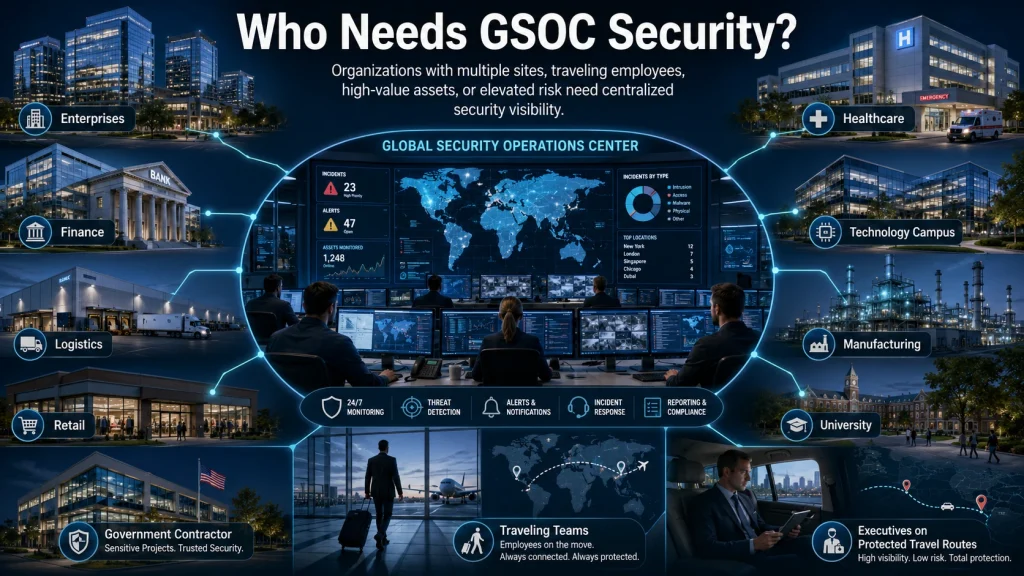
Not every organization needs a full 24/7 in-house GSOC. But many organizations need at least some GSOC security capability, especially if they operate across multiple locations or face elevated risk.
You may need GSOC security if your organization has:
- Multiple offices, sites, stores, or warehouses
- Employees who travel often
- High-value executives or public-facing leaders
- Sensitive intellectual property
- Regulated operations
- Critical infrastructure exposure
- Large employee populations
- Global supply chains
- High-value inventory
- Data centers or secure facilities
- Prior incidents involving threats, theft, violence, or disruption
Industries that often benefit include:
Large Enterprises
Large enterprises need centralized visibility across many teams, regions, and facilities. A GSOC helps reduce fragmented responses.
Multinational Companies
Multinational companies face different laws, threat environments, languages, cultures, and time zones. A GSOC helps standardize security operations.
Financial Institutions
Banks, investment firms, insurers, and payment companies often need strong physical security, cybersecurity coordination, executive protection, and incident documentation.
Healthcare Organizations
Hospitals, clinics, labs, and healthcare networks face workplace violence risk, patient safety concerns, access control needs, and compliance pressure.
Technology Companies
Technology companies often protect intellectual property, executives, campuses, data centers, and global employees.
Manufacturing Firms
Manufacturers need to protect plants, supply chains, employees, production uptime, and industrial systems.
Logistics Companies
Logistics organizations need visibility into warehouses, fleet operations, cargo security, route disruption, and facility access.
Retail Chains
Retailers may use GSOC security to monitor stores, distribution centers, theft trends, employee safety, and emergency events.
Universities
Universities manage open campuses, student safety, events, access control, emergency alerts, and crisis response.
Government Contractors
Government contractors often need strong security governance, access control, incident reporting, and compliance support.
Companies With Traveling Employees
Traveling employees can face risks that office-based teams do not see. GSOC support improves the duty of care.
Companies With High-Value Executives or Assets
If your leaders, facilities, research, inventory, or brand create elevated risk, a GSOC can help you monitor and respond with more control.
Benefits of GSOC Security
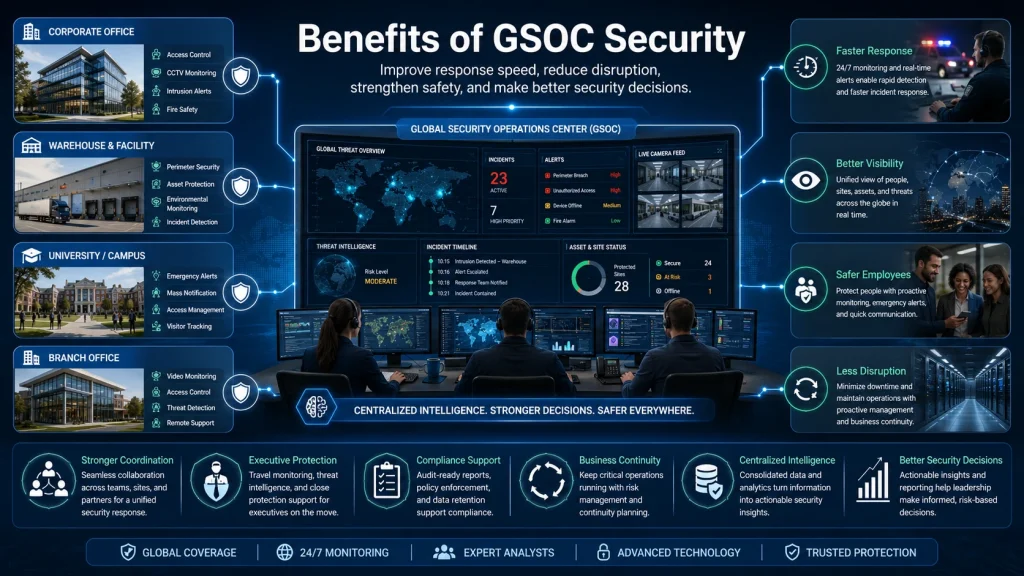
GSOC security gives your organization stronger visibility, faster response, and better coordination.
Faster Incident Response
When alerts flow into one security monitoring center, your team can detect, verify, and escalate incidents faster. This reduces confusion and delays.
Better Visibility
A GSOC gives you a broader view across facilities, cyber signals, travel risk, physical alarms, CCTV, intelligence feeds, and emergency events.
Stronger Coordination
A GSOC connects corporate security, cybersecurity, facilities, HR, legal, business continuity, executive protection, and local site teams.
Reduced Business Disruption
When you detect threats early, you can reduce downtime, reroute travelers, close sites, adjust staffing, or activate continuity plans.
Improved Employee Safety
GSOC security helps you monitor risks that affect employees, including severe weather, workplace violence, civil unrest, access breaches, and medical emergencies.
Better Executive Protection
A GSOC can give executive protection teams real-time intelligence, travel alerts, route support, and emergency coordination.
Stronger Compliance Support
Incident documentation, access logs, response records, and reporting help support audits, investigations, and regulatory requirements.
Centralized Security Intelligence
Your GSOC becomes a central source of security intelligence. Leaders can make decisions from verified information instead of scattered updates.
Better Decision-Making
Security leaders need context. A GSOC helps you see patterns, measure performance, and improve your security strategy over time.
In-House GSOC vs Managed GSOC Services
You can build your own GSOC, outsource it, or use a hybrid model. Managed GSOC services and GSOC as a service can be useful when you need 24/7 monitoring, but do not want to build a full internal operation.
In-House GSOC vs Managed GSOC Comparison Table
| Category | In-House GSOC | Managed GSOC Services |
|---|---|---|
| Cost | Higher upfront cost for facility, tools, staffing, and management | Lower upfront cost, usually subscription or service-based |
| Staffing | You hire, train, schedule, and retain analysts | Provider supplies trained analysts |
| Speed to launch | Slower, especially for 24/7 coverage | Faster, depending on integrations and scope |
| Expertise | Deep internal business knowledge | Broader experience across multiple clients and incidents |
| Technology | You select, buy, integrate, and maintain tools | Provider may include platform, dashboards, workflows, and reporting |
| Scalability | Can be harder and more expensive to scale | Easier to scale up or down |
| Control | Higher control over processes, data, and staffing | Less direct control, depends on the provider model |
| Best use cases | Large enterprises with complex internal needs and budget | Mid-size to large organizations needing faster maturity or 24/7 coverage |
| Risk | High cost if poorly designed | Vendor dependency is poorly governed |
| Hybrid option | Internal leadership with outsourced monitoring support | Managed monitoring with internal escalation owners |
Managed GSOC services work best when you define responsibilities clearly. You still need internal owners for decisions, escalation, business continuity, cyber coordination, and executive communication.
How to Build a GSOC Security Program
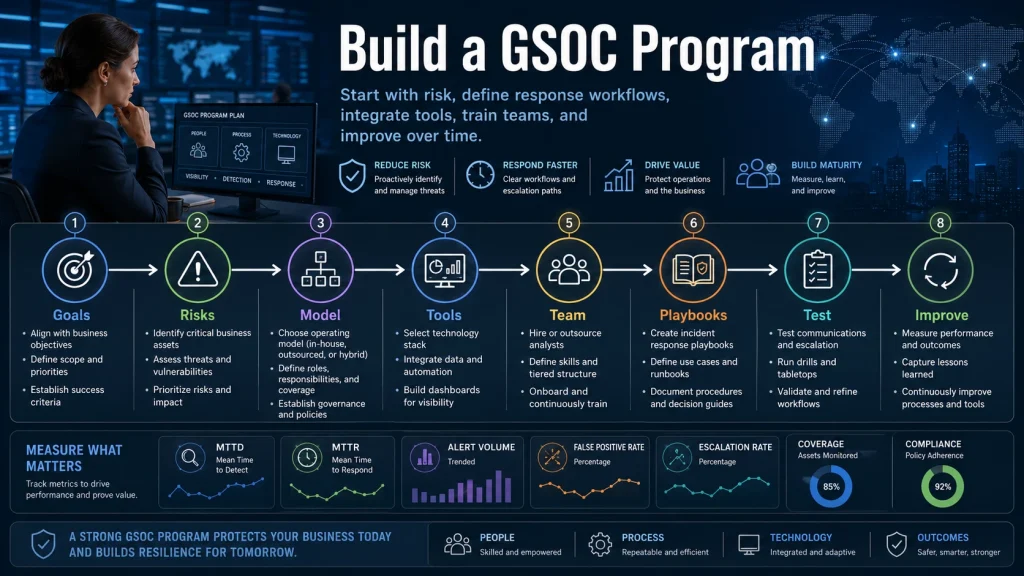
Building a GSOC security program requires more than buying software or setting up a room with screens. You need a clear operating model.
1. Define Your Security Goals
Start with the business outcome. Do you need to protect employees, monitor facilities, support travelers, improve incident response, coordinate cyber and physical security, or support executive protection?
Common goals include:
- Reduce incident response time
- Improve 24/7 monitoring
- Centralize security intelligence
- Protect traveling employees
- Support crisis management
- Improve physical and cyber coordination
- Strengthen reporting and compliance
2. Identify Assets and Risks
List what you need to protect. This may include people, executives, offices, warehouses, stores, data centers, labs, intellectual property, vehicles, supply chains, and critical systems.
Then map the risks that affect each asset.
3. Choose Your Operating Model
Decide whether you need an in-house GSOC, managed GSOC services, GSOC as a service, or a hybrid model.
Your decision should consider:
- Budget
- Risk level
- Number of locations
- Required coverage hours
- Compliance needs
- Internal staffing capacity
- Technology maturity
- Data sensitivity
- Executive expectations
4. Build Processes and Escalation Paths
A GSOC needs documented processes. Analysts should know what to do when an alert appears, who owns the response, and when to escalate.
Create escalation paths for:
- Facility breach
- Cyber incident
- Medical emergency
- Workplace violence threat
- Severe weather
- Travel emergency
- Executive threat
- Protest near the facility
- Supply chain disruption
- Data center incident
5. Select Tools and Integrations
Choose tools based on your risks, not trends. Your GSOC should integrate the systems that matter most.
Start with essential sources:
- Access control
- CCTV or VMS
- Threat intelligence
- Incident management
- Mass notification
- Travel risk platform
- Cybersecurity alerts
- Communication channels
6. Hire or Outsource the Right Team
GSOC analysts need judgment, communication skills, technical comfort, and calm decision-making. They must verify information, manage pressure, follow playbooks, and communicate with different stakeholders.
If you outsource, evaluate the provider’s analyst training, coverage model, escalation process, and reporting quality.
7. Create Incident Response Playbooks
Playbooks make responses consistent. Each playbook should define severity levels, required actions, escalation contacts, communication templates, evidence requirements, and closure steps.
8. Test Communication Workflows
A plan that has not been tested is only a document. Run tabletop exercises and simulations. Test emergency notifications, call trees, executive updates, and handoffs between GSOC, SOC, NOC, facilities, HR, and crisis teams.
9. Measure Performance
Track metrics such as mean time to detect, mean time to respond, false positive rate, escalation accuracy, incident volume, response time by incident type, and stakeholder satisfaction.
10. Improve Continuously
A GSOC should improve with every incident. Review what worked, what failed, what slowed response, and what needs to change.
GSOC Security Evaluation Checklist
Use this checklist when evaluating GSOC security solutions, managed GSOC services, or your internal program.
| Area | What to Check | Why It Matters | Priority |
|---|---|---|---|
| 24/7 monitoring | Confirm whether monitoring is continuous, after-hours only, or business-hours only. | Many incidents happen outside normal office hours | High |
| Incident response process | Review detection, verification, escalation, coordination, and closure steps | A clear process reduces confusion during incidents | High |
| Threat intelligence | Check sources for cyber, physical, geopolitical, weather, crime, and travel risk intelligence.ce | Better intelligence improves early warning | High |
| Physical security integration | Confirm integration with access control, CCTV, alarms, and visitor systems | Physical systems are core to GSOC security | High |
| Cybersecurity integration | Check whether SIEM, SOC, EDR, or IT alerts can be shared | Cyber and physical incidents can overlap | High |
| Access control monitoring | Review badge alerts, forced doors, door-held-open events, and restricted area monitoring. | Unauthorized access can create a major risk | High |
| CCTV monitoring | Confirm live monitoring, video review, retention, and analytics capabilities. | Visual context helps verify incidents | High |
| Travel risk monitoring | Check traveler tracking, alerts, destination risk, and emergency support | Traveling employees need real-time protection | Medium |
| Executive protection support | Review intelligence briefings, route support, emergency communication, and escalation. | Executives may face targeted risks | Medium |
| Emergency response | Confirm workflows for medical, fire, severe weather, violence, and evacuation events.s | Emergency response must be fast and clear | High |
| Reporting | Review dashboards, incident reports, trend analysis, and executive summaries | Good reporting supports decisions and audits | Medium |
| Escalation process | Confirm contact lists, severity levels, call trees, and backup owners | Weak escalation causes response delays | High |
| Tool integrations | Check APIs, data connectors, dashboard design, and alert routing | Disconnected tools increase analyst workload | High |
| Staffing model | Review analyst qualifications, shift coverage, supervision, and surge support. | People quality determines GSOC effectiveness | High |
| Compliance support | Check audit trails, logs, evidence handling, and reporting standards | Compliance teams need reliable records | Medium |
| Business continuity support | Confirm links to continuity plans, crisis teams, and recovery processes | Security incidents often affect operations | Medium |
| Service level agreements | Review response times, uptime, notification timelines, and reporting commitment.s | SLAs set clear expectations | High |
| Training and documentation | Check playbooks, analyst training, tabletop exercises, and knowledge base quality | Training makes the response consistent | High |
Common GSOC Security Challenges
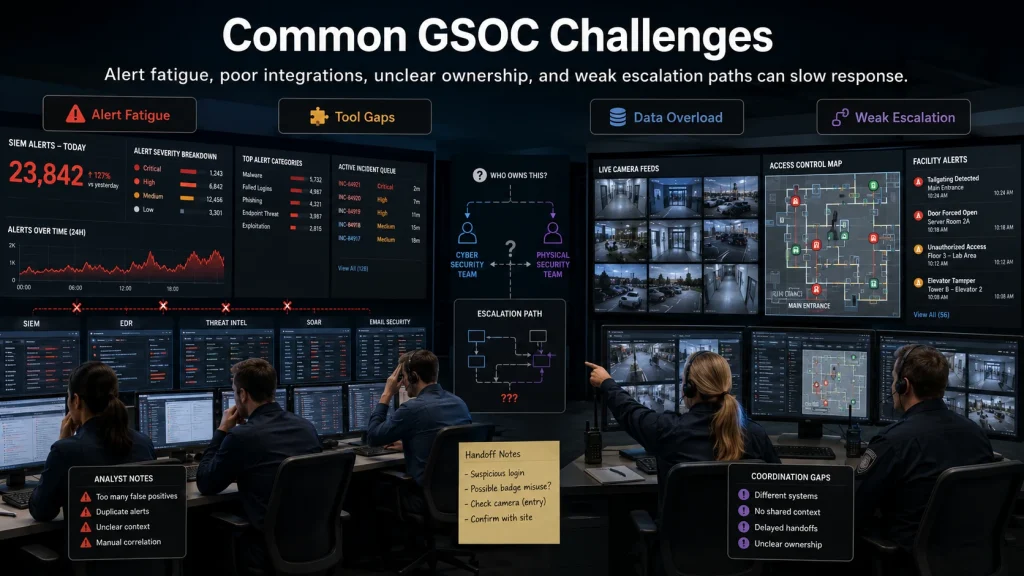
A GSOC can create strong value, but only if it is designed well. Many organizations struggle because they focus on tools before process.
Alert Fatigue
Too many alerts can overwhelm analysts. When every alert looks urgent, real incidents get missed.
To reduce alert fatigue:
- Tune alert rules
- Remove duplicate alerts
- Use severity levels
- Add context
- Review false positives
- Automate low-risk workflows
Poor Tool Integration
A GSOC with disconnected tools forces analysts to jump between systems. This slows response and increases errors.
Integration should connect access control, CCTV, case management, threat intelligence, travel systems, cyber alerts, and communication tools where possible.
Lack of Trained Analysts
GSOC analysts need more than screen monitoring skills. They need judgment, writing ability, communication discipline, security knowledge, and crisis response awareness.
Weak Escalation Paths
If analysts do not know who owns an incident, response slows. Every major incident type should have clear owners and backup contacts.
Siloed Cyber and Physical Security Teams
Cyber and physical security often operate separately. This creates blind spots. A badge misuse incident may connect to insider risk. A cyberattack may affect building systems. A facility breach may expose IT equipment.
A mature GSOC helps connect those signals.
Too Much Data and Not Enough Context
More data does not always mean better security. You need useful context. Analysts should know which assets are critical, which locations are high risk, who is traveling, and which alerts matter most.
High Operating Costs
An in-house 24/7 GSOC can be expensive. Staffing, training, tools, facilities, and management add up. Managed GSOC services may reduce upfront cost, but they still require governance.
Poor Reporting
If reporting only counts alerts, it may not help leaders. Strong reporting should explain trends, risk, response quality, and business impact.
Unclear Ownership During Incidents
During a crisis, ownership matters. Your GSOC should coordinate, but the business still needs decision-makers. Define who can close a site, notify employees, call law enforcement, approve travel changes, or brief executives.
Real-World GSOC Security Use Cases
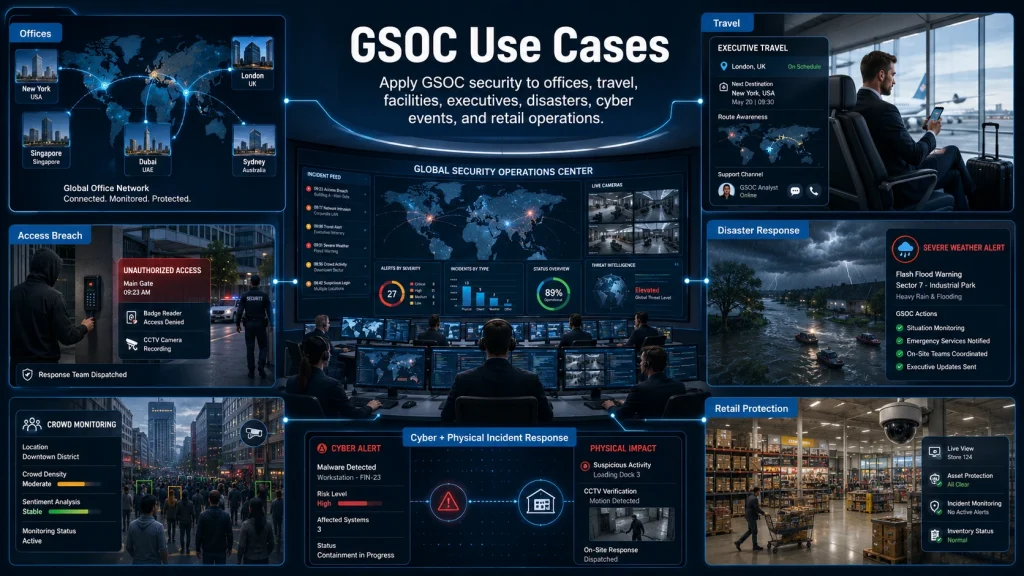
GSOC security becomes easier to understand when you see how it works in real situations.
Monitoring a Global Office Network
A company has offices in New York, London, Singapore, and Bengaluru. The GSOC monitors access control alerts, CCTV, local threat intelligence, weather, and employee safety notifications.
When a protest begins near the London office, the GSOC alerts local management, recommends adjusted entry routes, notifies employees, and monitors the situation until the area is clear.
Supporting Traveling Executives
An executive travels to a region with elevated civil unrest. Before the trip, the GSOC sends a risk briefing. During the trip, it monitors local conditions, flight changes, hotel area risk, and emergency contacts.
When demonstrations move toward the executive’s meeting location, the GSOC alerts the protection team and helps adjust the schedule.
Responding to a Facility Access Breach
An access control system reports a forced door at a restricted lab. The GSOC checks CCTV, confirms unauthorized entry, alerts onsite security, locks nearby access points, informs facility leadership, and opens an incident case.
If the lab contains sensitive systems, the GSOC also notifies the cybersecurity team.
Coordinating During a Natural Disaster
A severe storm threatens a warehouse and nearby employee homes. The GSOC monitors weather alerts, sends employee notifications, checks site status, coordinates closure decisions, and provides updates to business continuity leaders.
Tracking Civil Unrest Near Company Locations
A company has retail stores in areas where unrest is spreading. The GSOC maps incidents against store locations, recommends closures where needed, coordinates with regional managers, and tracks employee status.
Managing a Cyber and Physical Incident at the Same Time
A terminated employee attempts to badge into an office after hours while the SOC detects unusual login attempts from that person’s account. The GSOC and SOC share information, disable access, escalate to HR and legal, and preserve evidence.
Protecting Retail Stores or Warehouses
A retail chain uses a GSOC to monitor break-ins, alarms, camera alerts, weather events, and employee safety incidents across hundreds of locations. This gives leadership a consistent response model instead of relying on each site to manage incidents alone.
How to Measure GSOC Performance
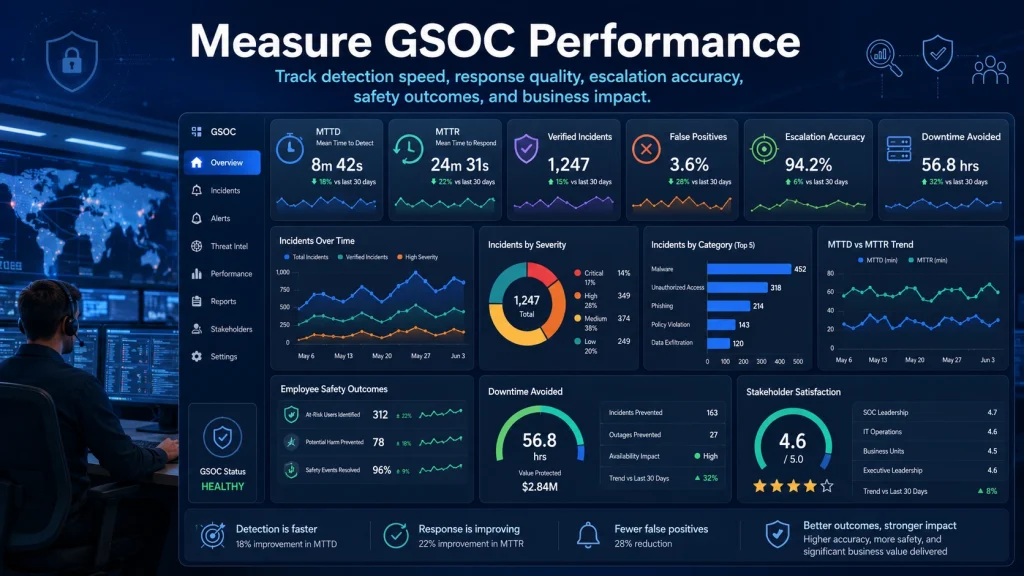
You need metrics to know whether your GSOC security program is working. The best metrics connect security activity to business outcomes.
Key GSOC performance metrics include:
Mean Time to Detect
How long does it take your GSOC to detect a potential incident?
Shorter detection times usually mean better monitoring, better tool integration, and clearer alert rules.
Mean Time to Respond
How long does it take to begin a response after detection?
This shows whether escalation paths and playbooks work.
Number of Verified Incidents
Track verified incidents, not just raw alerts. This helps separate noise from meaningful events.
False Positive Rate
A high false positive rate wastes analyst time. Reducing false positives improves focus and morale.
Escalation Accuracy
Measure whether analysts escalate incidents to the right people at the right severity level.
Response Time by Incident Type
Different incidents require different response speeds. Track response time for access breaches, medical events, cyber coordination, travel emergencies, severe weather, and executive protection issues.
Employee Safety Outcomes
Track successful welfare checks, emergency notifications delivered, travelers assisted, and incidents resolved without injury.
Downtime Avoided
Estimate how GSOC action helped reduce facility closures, logistics delays, IT disruption, or operational loss.
Compliance Reporting Quality
Review whether incident records are complete, accurate, searchable, and useful for audits.
Stakeholder Satisfaction
Ask internal teams whether GSOC support is clear, timely, and useful. Include corporate security, IT, facilities, HR, executives, and business continuity teams.
Final Thoughts
GSOC security gives your business a clearer way to monitor threats, respond to incidents, and protect people, facilities, executives, travelers, assets, and operations.
A Global Security Operations Center is not just a room with screens. It is a structured security operating model that combines trained analysts, threat intelligence, access control monitoring, CCTV monitoring, incident response, crisis management, communication workflows, and business continuity support.
The right GSOC model depends on your risk, size, budget, locations, and internal capabilities. Some organizations need a full in-house GSOC. Others can start with managed GSOC services or GSOC as a service. Many businesses benefit from a hybrid model that combines outsourced monitoring with internal decision-making.
If you are planning to improve enterprise security, incident response, or threat monitoring, use this GSOC security guide as a starting point to evaluate your current risks and build a stronger security operations model.
Frequently Asked Questions
What does GSOC stand for in security?
GSOC stands for Global Security Operations Center in security. It is a centralized security function that monitors threats, verifies incidents, coordinates response, and supports the protection of people, facilities, assets, travelers, executives, and business operations.
What is the difference between GSOC and SOC?
A GSOC focuses on broader enterprise security, including physical security, corporate security, travel risk, executive protection, crisis management, and business continuity. A SOC usually focuses on cybersecurity operations, including network threats, endpoint alerts, cloud attacks, malware, phishing, and identity-based threats.
What does a GSOC analyst do?
A GSOC analyst monitors security alerts, reviews CCTV and access control events, tracks threat intelligence, verifies incidents, escalates alerts, supports emergency response, documents cases, and communicates with security, IT, facilities, HR, legal, and crisis management teams.
Which companies need GSOC security?
Companies that need GSOC security often include large enterprises, multinational companies, financial institutions, healthcare organizations, technology companies, manufacturers, logistics firms, retail chains, universities, government contractors, and businesses with traveling employees, high-value executives, sensitive facilities, or distributed operations.
Is managed GSOC security better than building an in-house GSOC?
Managed GSOC security can be better if you need faster deployment, 24/7 coverage, trained analysts, and lower upfront cost. An in-house GSOC can be better if you need maximum control, deep internal knowledge, and dedicated resources. Many organizations choose a hybrid model.
