How can you prevent viruses and malicious code? Not with wishful thinking. Malware today isn’t just lurking in sketchy downloads; it’s hiding in emails, images, ads, and even legit websites. If you’re not actively defending your digital life, you’re already compromised. This guide arms you with real-world tactics, not fluff.
How can you prevent viruses and malicious code? If you’re still relying on that decade-old antivirus and avoiding “shady” sites, you’re living in a fantasy. Today’s threats are stealthy, often fileless, and they don’t need your permission to break in. One wrong click, and you’re owned your data, your machine, your digital identity.
Malicious code has evolved. It now leverages zero-days, socially engineered payloads, ad networks, and AI-crafted phishing. It doesn’t just crash your system; it hijacks it for profit, espionage, or chaos.
This blog is your no-bullshit blueprint for defense. We’ll break down how to prevent viruses and malicious code in practice, layer by layer.
You’ll learn how to build a digital perimeter, train your instincts, and harden your environment. This isn’t just tech advice. It’s survival in the age of digital warfare.
Why Antivirus Alone Can’t Fully Prevent Viruses and Malicious Code

A common misconception is that installing an antivirus program is enough to protect your system. While antivirus solutions are essential, they are not a complete answer to the question: How can you prevent viruses and malicious code?
Read More On: Clearnet vs Darknet: Key Differences Explained
Modern cyber threats are more advanced than ever, and attackers use techniques that can easily bypass traditional antivirus software. Here’s why relying on antivirus software alone is risky:
- Signature-Based Limitations
Most antivirus software relies on signature databases to identify known malware. However, cybercriminals create new variants daily, meaning your antivirus might not recognize freshly developed malicious code until the vendor updates its database. By then, your system could already be compromised. - Polymorphic and Fileless Malware
Advanced threats often mutate their code (polymorphic malware) or operate directly in system memory, leaving no files behind (fileless malware). These types are notoriously difficult for antivirus programs to detect. - Zero-Day Exploits
Antivirus software cannot always catch zero-day attack vulnerabilities that are exploited before vendors release a patch. Cybercriminals specifically target these weaknesses, making traditional defenses ineffective. - Human Factor
Even the best antivirus cannot stop a user from clicking a malicious link, downloading a suspicious attachment, or falling for a phishing scam. Social engineering remains one of the top methods hackers use to deliver malicious code. - False Sense of Security
Relying solely on antivirus software often leads to complacency. Users may engage in risky behavior online, assuming the software will always protect them, when in reality, it only forms one layer of defense.
Building a Security Stack to Prevent Viruses and Malicious Code
When people ask, “How can you prevent viruses and malicious code?” the most common advice is “install an antivirus.” While antivirus software is a critical foundation, it’s only one piece of the puzzle. Cybercriminals today use sophisticated methods that can bypass signature-based detection.
Read More On: Incognito vs VPN: Which Protects Your Privacy Better?
The real answer lies in building a security stack, a layered defense system where multiple tools, processes, and human awareness work together to stop, detect, and mitigate threats.
Think of it like securing a castle: you wouldn’t rely on a single wall to defend against invaders. You’d need gates, guards, patrols, and emergency plans. The same is true in cybersecurity. Let’s break down each layer of the modern security stack in detail.
1. Antivirus & Endpoint Protection
Why it matters:
Antivirus scans files, identifies known malware signatures, and blocks infected content. It’s your first line of defense against common viruses, worms, and trojans. Without it, you’d be vulnerable to thousands of well-known threats circulating online.
Read More On: Deep Search Engine: Explore Beyond Google
Limitations:
Traditional antivirus software relies heavily on databases of known threats. But attackers release hundreds of thousands of new malware samples daily, many of which mutate or disguise themselves to avoid detection. That’s why antivirus alone often fails to prevent advanced attacks.
Next-Level Defense:
- Deploy Next-Gen Antivirus (NGAV) or Endpoint Detection and Response (EDR) solutions. These detect suspicious behaviors, such as processes trying to encrypt files rapidly (a ransomware sign).
- Centralize endpoint monitoring so IT teams can respond quickly to any infection.
Example: If ransomware starts encrypting files, EDR can automatically isolate the infected machine from the network before it spreads.
Read More On: St Paul Cyber Attack: What Really Happened
2. Firewalls & Network Security
Why it matters:
Even if malware enters your system, it often needs to “phone home” to a command-and-control (C2) server. Firewalls block unauthorized inbound and outbound traffic, stopping malware from spreading or stealing data.
Types of Firewalls:
- Personal firewalls on individual devices (Windows Defender Firewall, macOS firewall).
- Network firewalls for enterprises, often with intrusion detection/prevention (IDS/IPS).
- Next-Gen Firewalls (NGFWs) that combine deep packet inspection, threat intelligence, and app-aware filtering.
Best Practices:
- Block unused ports to reduce your attack surface.
- Monitor logs for unusual traffic patterns, such as massive outbound data flows.
- Combine with a Web Application Firewall (WAF) if you’re protecting websites.
Example: A properly configured firewall can stop a keylogger from sending stolen passwords to an attacker.
3. System & Software Updates
Why it matters:
One of the most overlooked answers to “How can you prevent viruses and malicious code?” is simply keeping software updated. Many attacks exploit unpatched vulnerabilities.
Statistics: According to Ponemon Institute, 57% of data breaches are caused by attackers exploiting unpatched software.
Action Plan:
- Enable automatic updates for your operating system and browsers.
- For businesses, deploy a patch management solution (e.g., WSUS, ManageEngine, Ivanti).
- Don’t forget “hidden” software like router firmware, CMS platforms (WordPress), and browser extensions.
Example: The infamous WannaCry ransomware attack spread by exploiting unpatched Windows systems. Machines updated with Microsoft’s patch were immune.
Protect your personal information before hackers misuse it by exploring the best Dark Web Monitoring Tools that scan hidden marketplaces and alert you instantly.
4. Email & Web Filtering
Why it matters:
Most infections don’t start with a hacker brute-forcing your system; they start with phishing emails or malicious websites. Email filters block spam, phishing attempts, and dangerous attachments, while web filters stop access to compromised or fake sites.
Best Practices:
- Use an email security gateway like Proofpoint, Mimecast, or Microsoft Defender for Office 365.
- Enable sandboxing for attachments so suspicious files are opened in a safe environment before reaching users.
- Deploy DNS filtering (like Cisco Umbrella or Cloudflare Gateway) to prevent access to malicious sites.
Example: If an employee clicks on a fake invoice email, a security gateway can block the malicious attachment before it reaches their inbox.
Read More On: How to block radiation from wifi router?
5. Backup & Recovery
Why it matters:
No matter how strong your defenses, there’s always a chance something slips through. Backups are your safety net against ransomware, accidental deletion, or catastrophic failure.
Best Practices:
- Follow the 3-2-1 Backup Rule:
- 3 copies of your data,
- stored on 2 different media types,
- With 1 stored offline or in the cloud.
- 3 copies of your data,
- Test backups regularly. Many organizations only discover corrupted backups during a crisis.
- Encrypt backups to prevent exposure in the event of theft.
Example: Companies hit by ransomware often have to choose between paying attackers or restoring from backups. Those with offline backups can recover without giving in.
6. Behavior Monitoring & Threat Intelligence
Why it matters:
Modern malware often evades traditional tools by mimicking normal activity. Behavior-based monitoring uses analytics and AI to detect unusual actions.
Tools to Consider:
- SIEM (Security Information and Event Management) systems aggregate logs across your environment to spot anomalies.
- XDR (Extended Detection & Response) combines data from endpoints, networks, and cloud apps for a unified view.
- Threat intelligence feeds keep defenses updated with the latest known attacker tactics.
Example: A SIEM might flag when a user account downloads 50GB of data at 3 AM, an unusual behavior that could signal a breach.
7. User Awareness & Security Culture
Why it matters:
Technology alone won’t protect you if people keep making mistakes. Human error remains the top cause of security incidents. Attackers know this social engineering (tricking users) is one of the fastest ways to bypass defenses.
Action Steps:
- Run security awareness training every quarter.
- Use phishing simulations to test employee responses.
- Create a “security-first” culture where employees feel comfortable reporting suspicious activity.
Example: Training users to hover over links before clicking can stop a phishing attack before it begins.
8. Multi-Factor Authentication (MFA)
Why it matters:
Even if malware steals your username and password, MFA provides a second barrier, like a fingerprint scan, security app code, or hardware token.
Best Practices:
- Use app-based authenticators (Google Authenticator, Authy) instead of SMS, which can be intercepted.
- Enforce MFA on email, VPN, and cloud accounts, the most targeted systems.
- Consider passwordless authentication (like FIDO2 security keys) for high-value systems.
Example: A hacker who steals your credentials can’t log into your bank account if they also need your physical security key.
9. Additional Layers for Businesses
If you’re running an organization, your security stack may also include:
- Data Loss Prevention (DLP): Prevents sensitive data from leaving your network.
- Endpoint Encryption: Protects lost or stolen devices.
- Zero Trust Architecture: Requires verification for every access attempt, even inside the network.
- Incident Response Plans: Predefined steps for handling breaches quickly and efficiently.
Training the Human Firewall: How to Prevent Malware with Behavior
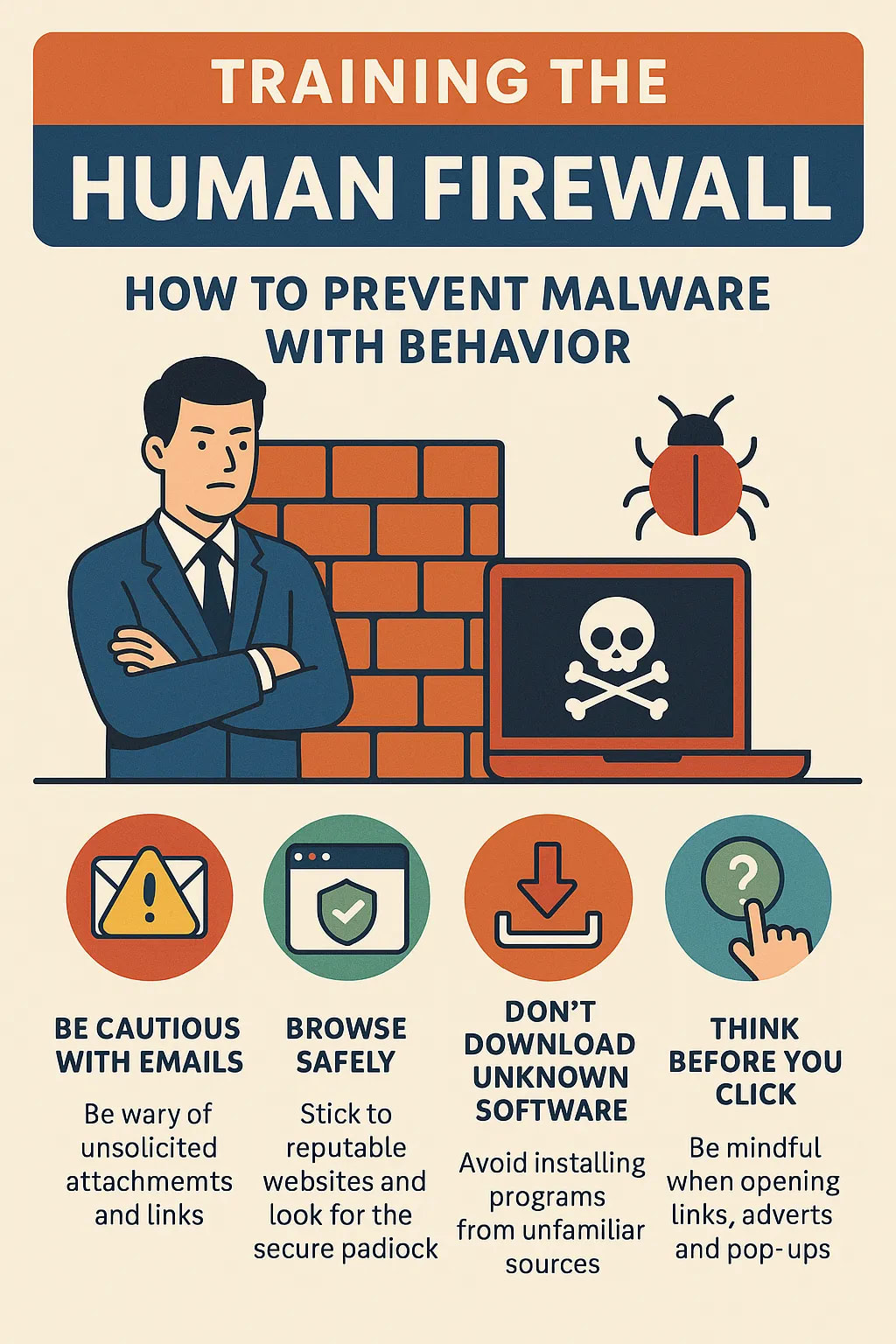
When people ask, “How can you prevent viruses and malicious code?” the natural assumption is to install antivirus software or deploy advanced detection tools. While those are important, technology alone cannot prevent all cyberattacks. The truth is that human behavior plays just as critical a role.
In fact, according to IBM’s Cybersecurity Intelligence Index Report, 95% of security breaches are caused by human error.
Whether it’s clicking on a malicious link, downloading an infected attachment, or ignoring a software update, one small mistake can open the door for malware.
This is why organizations must invest not just in technical defenses, but in training their employees to become a human firewall.
Read More On: What Is CSAM in Cybersecurity? Complete Guide
A human firewall means creating a workforce that acts as the first line of defense against cyberattacks, employees who recognize threats, think critically before clicking, and follow best practices to minimize risks. Let’s look at how behavior directly prevents viruses and malicious code.
1. Recognizing Social Engineering Tactics
Cybercriminals don’t always need to exploit vulnerabilities in software; they exploit vulnerabilities in people.
- Phishing emails remain the most common attack vector, with 36% of breaches involving phishing (Verizon DBIR 2024).
- Attackers often impersonate trusted brands, managers, or government agencies to lure victims.
- Training employees to check sender addresses, hover over links, and verify requests dramatically reduces infection risk.
2. Practicing Safe Digital Hygiene
Small daily actions can determine whether malware spreads or gets blocked. Employees must learn to:
- Use strong, unique passwords for every account.
- Enable multi-factor authentication (MFA) to prevent credential theft.
- Keep operating systems and applications regularly updated to close known vulnerabilities.
- Avoid downloading software or apps from unverified sources.
Every one of these behaviors limits the attack surface and makes it harder for malicious code to gain a foothold.
3. Creating a Culture of Vigilance
Training alone isn’t enough if employees feel cybersecurity is “not their job.” Leaders must promote a security-first culture where everyone understands they play a role in defense.
- Encourage employees to pause and verify before clicking on unknown links.
- Build a “see something, say something” policy for suspicious emails or system behavior.
- Celebrate employees who report phishing attempts, reinforcing positive behavior.
When staff feel accountable and supported, they act more carefully, and that vigilance directly prevents malware infections.
Read More On: Cyber Security vs Software Engineering: Code or Defend?
4. Testing and Reinforcing Awareness
One-time training doesn’t work because attackers constantly adapt. Organizations must:
- Run simulated phishing campaigns to measure real-world readiness.
- Provide micro-training and refreshers after incidents or simulation failures.
- Use gamification, leaderboards, and recognition to keep employees engaged.
According to Proofpoint, companies with ongoing awareness programs experience up to 70% fewer successful phishing attacks than those that rely only on annual training.
5. Reducing Breach Impact with Quick Reporting
Even if someone accidentally clicks, quick reporting can stop malware before it spreads.
- IBM found that the average breach detection time is 204 days, giving attackers months to exploit systems.
- By training employees to report suspicious emails or unusual device behavior immediately, IT teams can respond faster and contain threats.
This behavioral change, reporting rather than ignoring, can be the difference between a blocked infection and a costly data breach.
Why Behavior is the Strongest Defense
Firewalls, antivirus, and EDR tools are powerful, but they can be bypassed. Human behavior, however, adds a dynamic and intelligent layer of defense.
Employees trained as human firewalls can recognize context, use judgment, and block threats at the earliest stage.
When people practice good digital hygiene, stay alert to phishing, and report suspicious activity, the chance of a successful malware attack drops dramatically. In other words, the human firewall is not just a backup defense; it’s one of the most critical security layers.
Read More On: What Is an Insider Threat Cyber Awareness?
Advanced Tactics to Prevent Malicious Code in Complex Systems
When businesses and security leaders ask, “How can you prevent viruses and malicious code?”, the answer is not only basic antivirus or employee training, especially in large, interconnected IT environments.
Complex systems such as cloud infrastructures, enterprise networks, and IoT ecosystems require advanced defense strategies to stay ahead of sophisticated threats.
Malware authors today use fileless attacks, polymorphic code, and living-off-the-land techniques that can slip past traditional tools.
This is where advanced tactics come into play.
1. Zero Trust Architecture (ZTA)
Traditional security models assume users and devices inside the network are “trusted.” That assumption is outdated. A Zero Trust Architecture enforces the principle of “never trust, always verify.”
- Every access request is authenticated, authorized, and encrypted, regardless of location.
- Micro-segmentation prevents malware from moving laterally within the system.
- Continuous monitoring ensures that even compromised accounts are quickly detected.
By combining Zero Trust with strong identity management, organizations greatly reduce the risk of viruses and malicious code spreading undetected.
2. Endpoint Detection and Response (EDR) & Extended Detection and Response (XDR)
Advanced malware rarely triggers signature-based antivirus. That’s why EDR/XDR tools are critical in complex systems.
- EDR continuously monitors endpoint behavior to spot anomalies such as unusual process execution or file access.
- XDR extends this visibility across email, cloud, network, and endpoints for correlated threat detection.
- Behavioral analytics detect fileless attacks that never drop a malicious file to disk.
According to Gartner, organizations using EDR/XDR solutions see a 50% faster mean-time-to-detect (MTTD) compared to those relying only on antivirus.
3. Runtime Application Self-Protection (RASP)
Modern malware often exploits vulnerabilities in business applications. RASP tools run inside the application itself, detecting and blocking malicious behavior in real time.
- Prevents SQL injections, buffer overflows, and code injections before they succeed.
- Provides visibility into how malicious code tries to manipulate applications.
- Reduces reliance on perimeter defenses by embedding protection into the workload.
This is particularly effective in cloud-native and microservices environments where traditional perimeter firewalls are less effective.
4. Threat Intelligence–Driven Security
Attackers constantly evolve, so defenses must evolve too. Threat intelligence platforms (TIPs) integrate global threat feeds into your defenses.
- Enable proactive blocking of malicious IPs, domains, and file hashes.
- Correlate external intelligence with internal logs to spot early signs of malware campaigns.
- Support faster incident response by providing context around attack vectors.
By feeding threat intel into SIEM systems, organizations can identify and stop malicious code before it executes.
Read More On: What Is GRC in Cybersecurity? Complete Guide
5. Sandboxing and Detonation Chambers
Sophisticated malware often uses delayed execution or checks if it’s running inside a virtual machine to avoid detection.
- Sandboxing allows suspicious files and links to be opened in an isolated environment before reaching the user.
- Detonation chambers analyze the full behavior of files (e.g., API calls, registry changes) to identify zero-day threats.
This helps prevent malicious code from infiltrating production systems, even if traditional defenses miss the initial signature.
6. Secure DevOps (DevSecOps) Practices
In complex environments, malicious code doesn’t just come from emails; it can be injected during software development or supply chain attacks.
- Shift security left by integrating code scanning and dependency analysis in CI/CD pipelines.
- Enforce software composition analysis (SCA) to identify vulnerable open-source libraries.
- Implement code signing and integrity checks to ensure deployed software hasn’t been tampered with.
DevSecOps ensures that viruses and malicious code are blocked at the earliest stage before they ever reach production.
7. Advanced Network Defense (AI-Driven Monitoring)
Modern networks are too vast for manual monitoring. AI and machine learning models can detect patterns of malicious code execution at scale.
- Identify unusual east-west traffic that may indicate malware spreading laterally.
- Detect anomalies in encrypted traffic without decryption (TLS fingerprinting).
- Provide automated playbooks for rapid response and isolation.
According to MITRE, AI-assisted monitoring can improve detection rates of advanced persistent threats (APTs) by up to 30% compared to rule-based systems.
Real-World Malware Case Studies
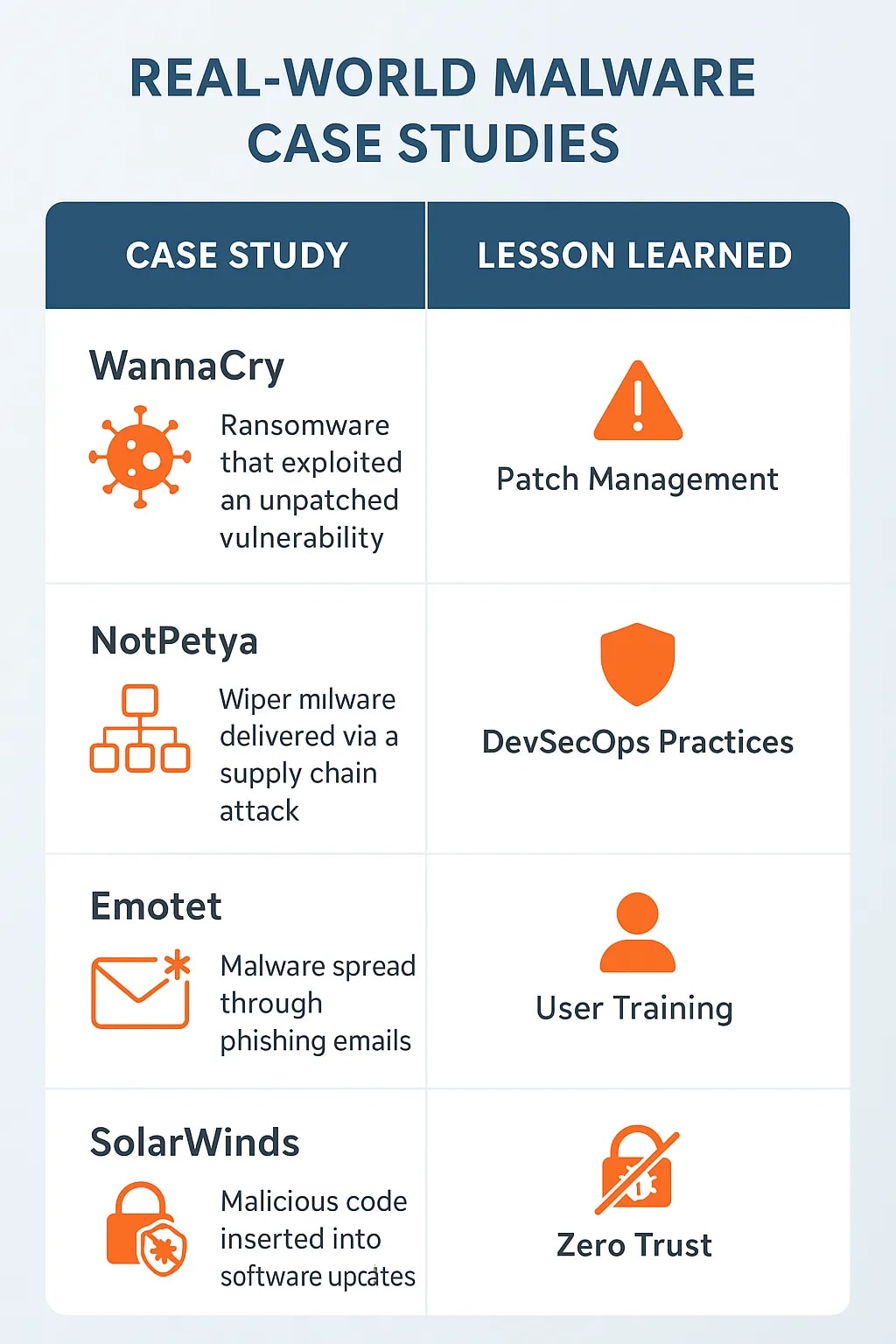
Understanding “How can you prevent viruses and malicious code” becomes clearer when we examine high-profile attacks that crippled global businesses. Each case highlights not only the sophistication of malware but also the behavioral and technical gaps that allowed it to succeed.
WannaCry Ransomware (2017)
- What happened: WannaCry exploited a Microsoft Windows vulnerability (EternalBlue) and spread like wildfire across 150+ countries, encrypting files and demanding a Bitcoin ransom.
- Impact: It hit hospitals, telecom companies, and businesses worldwide. The UK’s NHS canceled thousands of appointments, costing billions in damages.
- Lesson learned: Regular patching could have prevented this. Microsoft had released a fix months before the attack. It proves that basic digital hygiene and patch management are crucial in stopping malicious code.
NotPetya (2017)
- What happened: Initially disguised as ransomware, NotPetya was a wiper malware launched through a compromised Ukrainian accounting software update.
- Impact: It caused $10 billion in damages, disrupting Maersk’s global shipping operations and paralyzing logistics worldwide.
- Lesson learned: This was a supply chain attack, showing the need for DevSecOps practices, code integrity checks, and software supply chain monitoring to prevent malicious code injections.
Emotet Malware (2014–2021)
- What happened: Emotet spread through malicious Word macros in phishing emails, often appearing as fake invoices or delivery notices. Once installed, it downloaded additional malware like ransomware.
- Impact: It became one of the most prolific malware strains, costing victims up to $2.5 million per incident.
- Lesson learned: User awareness training and disabling unnecessary macros could have prevented most infections. This case shows why the human firewall is just as critical as technical defenses.
SolarWinds Supply Chain Attack (2020)
- What happened: Hackers compromised SolarWinds’ Orion software updates, inserting malicious code that was distributed to 18,000+ customers, including U.S. government agencies and Fortune 500 firms.
- Impact: Considered one of the most significant espionage campaigns in history, it allowed attackers long-term access to sensitive networks.
- Lesson learned: Even trusted vendors can become a threat vector. This highlights the importance of Zero Trust Architecture, runtime monitoring (RASP), and strict third-party risk management.
Zeus Banking Trojan (2007–Present)
- What happened: Zeus spread via drive-by downloads and phishing emails, stealing online banking credentials by logging keystrokes.
- Impact: It caused hundreds of millions in financial losses, fueling one of the largest cybercrime ecosystems.
- Lesson learned: Multi-factor authentication (MFA) and anomaly detection in transactions could have stopped much of the damage. It shows that financial systems must go beyond antivirus software to protect users.
Key Takeaways from Case Studies
- Patch Management Matters – WannaCry proved outdated systems are easy prey.
- Supply Chain Vigilance – NotPetya and SolarWinds showed attackers exploit trusted channels.
- Human Behavior is Critical – Emotet highlighted how a single careless click can trigger disaster.
- Layered Defenses Work – MFA, Zero Trust, EDR, and RASP collectively reduce risks.
How to Respond When Viruses or Malicious Code Breach Your Defenses

No matter how advanced your security stack is, firewalls, EDR, SIEM, and even a well-trained human firewall, there is no such thing as 100% protection.
Cybercriminals constantly develop new evasion techniques: zero-day exploits, fileless malware, and socially engineered phishing emails that slip through even the best filters.
That means the real test of cybersecurity maturity isn’t whether you can block every virus or piece of malicious code, it’s whether you can respond effectively when something inevitably breaks through.
If you’ve ever wondered, “How can you prevent viruses and malicious code from turning into a full-scale business crisis?”, the answer lies in a structured incident response lifecycle.
1. Early Detection and Monitoring
The faster you detect malicious activity, the less damage it causes. According to IBM’s 2024 Cost of a Data Breach Report, the average breach lifecycle is 204 days to detect + 73 days to contain. Organizations with strong monitoring reduced this by nearly half.
Detection strategies include:
- Endpoint Detection & Response (EDR/XDR): Monitors abnormal processes, such as PowerShell running without authorization or hidden scripts executing in memory.
- SIEM & SOAR: Aggregate logs from across the network to flag unusual spikes in traffic, multiple failed logins, or unauthorized file transfers.
- User Behavior Analytics (UBA): Spots deviations like an employee logging in from two countries at once.
Best practice: Configure alerts for both signature-based threats and behavioral anomalies. Viruses often mutate, but behaviors (e.g., privilege escalation, data exfiltration attempts) are harder to disguise.
2. Immediate Isolation and Containment
Once a threat is detected, speed is everything. Malware spreads laterally within minutes, especially in flat networks.
Steps to isolate effectively:
- Disconnect infected devices from Wi-Fi, Ethernet, and VPN.
- Segment affected systems into quarantine VLANs.
- Suspend compromised accounts to prevent credential abuse.
- Stop suspicious processes but preserve forensic evidence (don’t just delete files).
Case in point: In the 2017 WannaCry outbreak, organizations that rapidly segmented networks were able to contain infections within isolated departments, while others saw entire networks encrypted.
Use Our Cybersecurity Risk Calculator
3. Assess the Scope of Compromise
After isolation, investigate:
- What is infected? Endpoints, servers, email systems, or cloud apps?
- How did it enter? Phishing email, unpatched vulnerability, malicious USB?
- What data is at risk? Sensitive PII, financial data, or intellectual property?
- Who is affected? Just one department, or multiple business units worldwide?
This is where digital forensics comes in, analyzing system logs, memory dumps, and malware samples to understand the scope of infection.
Best practice: Maintain a forensic readiness policy so your team can preserve evidence legally and technically if regulators or law enforcement get involved.
4. Containment Before Eradication
Resist the temptation to jump straight into deleting malware. If you remove it too quickly without studying it, you may:
- Lose forensic evidence.
- Miss hidden persistence mechanisms.
- Fail to see lateral infections elsewhere.
Containment techniques include:
- Blocking malicious domains and IPs at the firewall level.
- Using application whitelisting to stop malware from executing further.
- Deploying network-level blocks for known Indicators of Compromise (IOCs).
5. Eradication of Malicious Code
Once contained, move to removal and eradication. This step is where IT teams use all available tools:
- Advanced anti-malware scans for infected files and rootkits.
- Memory analysis tools for fileless malware.
- Manual registry and process inspection to find persistence mechanisms.
- Re-imaging systems in cases where malware has deeply embedded itself.
Case in point: With Emotet, even if you removed the visible infection, the malware often left scheduled tasks and registry entries to reinfect on reboot. Eradication required thorough persistence checks.
6. Recovery and Business Continuity
Eradication is useless unless you can safely restore operations.
- Restore only from clean, verified backups. Ransomware often targets backups, so integrity checks are critical.
- Monitor recovered systems for any reappearance of IOCs.
- Gradually reconnect systems to production networks instead of rushing them back online.
Organizations with tested disaster recovery plans recover on average 61% faster than those improvising during a crisis.
7. Post-Incident Learning and Strengthening
Every breach is an opportunity to improve.
- Conduct a “lessons learned” review with IT, security, and leadership teams.
- Update incident response playbooks with new detection rules and response checklists.
- Share IOCs with your industry’s threat intelligence community.
- Retrain employees if human error was involved (e.g., phishing click).
Best practice: Treat incidents like fire drills. Conduct tabletop exercises where staff simulate ransomware or insider attacks, so everyone knows their role.
8. Communication and Compliance
Never forget the human and legal side of incident response.
- Internal communication: Keep employees informed to prevent panic.
- Customer communication: If data was compromised, transparency builds trust.
- Regulatory compliance: Under GDPR, HIPAA, or PCI DSS, you may be required to notify regulators and customers within strict timelines.
Example: Equifax’s 2017 breach response failed not only technically but also reputationally. Delayed disclosures and poor communication damaged brand trust as much as the breach itself.
Read More On: The Role of ZTNA and VPN in Modern Cybersecurity Strategies
How AI Helps Prevent Viruses and Malicious Code

1. Machine Learning–Based Detection
AI models analyze massive datasets of known and unknown malware to identify patterns of malicious behavior rather than relying only on signatures.
- Detects anomalies such as unusual process execution, privilege escalation, or encrypted traffic patterns.
- Flags even zero-day malware that’s never been seen before.
- Continuously improves through self-learning as it ingests new threat data.
Example: Microsoft Defender’s AI models process 8 trillion security signals daily, helping stop attacks before they spread.
2. Predictive Threat Intelligence
AI doesn’t just react; it predicts. By scanning global data feeds, AI systems can:
- Identify emerging attack trends before they hit mainstream.
- Correlate data across industries to detect coordinated campaigns.
- Provide threat scoring to prioritize the most dangerous vulnerabilities for patching.
This shifts organizations from reactive defense to proactive prevention.
3. Automated Malware Analysis and Sandboxing
Traditional sandboxing is resource-heavy and time-consuming. AI-enhanced sandboxing:
- Runs files in virtual environments and uses deep learning to analyze behavior in seconds.
- Identifies malicious intent even in polymorphic malware that rewrites its code on every execution.
- Reduces false positives by differentiating between legitimate scripts and malicious activity.
4. Adaptive Email and Phishing Defense
Since phishing remains the #1 malware delivery method, AI email security is critical.
- Natural Language Processing (NLP) models detect subtle signs of AI-generated phishing emails (e.g., ChatGPT-written lures).
- AI models analyze tone, urgency, and unusual requests instead of just scanning for malicious links.
- Advanced solutions detect image-based phishing (logos/screenshots with embedded links) that bypass traditional filters.
Example: Google’s AI blocks 100 million phishing emails per day in Gmail by analyzing behavioral and linguistic anomalies.
5. Autonomous Incident Response
AI is not just about detection; it’s about speed of response.
- Automated systems can quarantine endpoints within seconds of detecting suspicious behavior.
- AI-driven playbooks (in SOAR systems) trigger immediate containment actions such as blocking IPs, disabling accounts, or isolating workloads.
- Reduces “dwell time,” the period attackers remain undetected inside networks.
Organizations using AI-based response cut breach lifecycles by 74 days on average compared to those without AI (IBM 2024).
Challenges and Limitations of AI in Malware Prevention
- False Positives: Overly aggressive AI may block legitimate applications, causing business disruption.
- Adversarial AI: Cybercriminals are also using AI to craft more convincing phishing and malware that can “trick” detection models.
- Resource Intensive: Training AI models requires massive computing power and large, diverse datasets.
- Human Oversight Still Needed: AI is a powerful tool, but human analysts must guide and fine-tune systems.
The Future: AI + Human Synergy
AI won’t replace security professionals; it will augment them. The future of preventing viruses and malicious code lies in combining:
- AI-driven detection and automation for scale and speed.
- Human intelligence for contextual decision-making, creative threat hunting, and policy enforcement.
Common Myths About Preventing Malware

When people ask, “How can you prevent viruses and malicious code?” they often run into outdated advice and half-truths.
The cybersecurity landscape has evolved dramatically, but many myths still circulate, leaving individuals and businesses with a false sense of security.
Let’s break down the most common misconceptions about malware prevention.
Myth 1: Antivirus Alone Will Keep You Safe
Many believe that installing antivirus software is enough. While antivirus software remains important, it’s only a single layer of defense.
- Modern malware is polymorphic; it changes its code to evade signature-based detection.
- Fileless malware doesn’t drop files at all, meaning traditional antivirus often misses it.
- Attackers frequently bypass antivirus software by exploiting human behavior (e.g., phishing).
Reality: Antivirus is necessary but insufficient. True prevention requires a multi-layered security stack including EDR/XDR, firewalls, patch management, and employee awareness.
Myth 2: Macs and Mobile Devices Don’t Get Malware
There’s a common belief that malware only targets Windows PCs. This was once partially true, but not anymore.
- macOS malware like Silver Sparrow and OSX/Shlayer have infected hundreds of thousands of devices.
- Android malware (banking trojans, spyware apps) is on the rise due to unverified app downloads.
- Attackers follow the money, and since businesses now rely heavily on mobile devices, they’ve become prime targets.
Reality: All platforms are vulnerable. Malware prevention must extend to Macs, smartphones, and IoT devices, not just Windows.
Myth 3: Strong Passwords Are Enough
Yes, strong passwords are critical, but they won’t stop malware infections. If attackers trick you into installing a keylogger or use a credential-stealing trojan, your password strength doesn’t matter.
- Many attacks bypass passwords altogether through phishing, session hijacking, or exploiting unpatched apps.
- Password reuse across accounts creates a chain of compromises.
Reality: Strong passwords help, but you also need multi-factor authentication (MFA), phishing awareness, and endpoint security.
Myth 4: Software Updates Are Optional
Some users delay patches, thinking antivirus software will cover them. But attackers actively scan the internet for unpatched systems.
- WannaCry ransomware (2017) spread because organizations ignored a patch Microsoft released months earlier.
- Unpatched vulnerabilities remain one of the top 3 attack vectors for malware delivery.
Reality: Patch management is non-negotiable. Outdated software is an open door for viruses and malicious code.
Myth 5: Only Big Companies Get Targeted
Small businesses often assume they’re “too small” to be attacked. The opposite is true.
- Cybercriminals know small businesses have weaker defenses, making them easier targets.
- Verizon’s 2024 Data Breach Investigations Report showed that 46% of breaches involved small to medium-sized businesses.
Reality: Every organization, regardless of size, is a potential target. Malware is often automated; it doesn’t “choose,” it spreads wherever it can.
Myth 6: Employees Don’t Need Training, Just IT Protection
Some organizations think firewalls and email filters can do all the work. But human error remains the #1 cause of breaches.
- Clicking on malicious links.
- Downloading unverified software.
- Falling for social engineering scams.
Reality: Employees must be trained as the human firewall, spotting suspicious emails, verifying requests, and reporting incidents quickly.
Myth 7: Free Wi-Fi Is Safe if You Use HTTPS
While HTTPS provides encryption, it doesn’t protect against all attacks on public Wi-Fi.
- Attackers can still launch man-in-the-middle (MITM) attacks or set up fake hotspots.
- Malware can spread via shared, unsecured networks.
Reality: Always use a VPN when connecting to public Wi-Fi, and avoid sensitive logins on untrusted networks.
Myth 8: You’ll Know If Your System Is Infected
Hollywood portrays malware with flashing pop-ups and obvious disruptions. In reality, many strains operate silently.
- Banking trojans and spyware are designed to remain undetected for months.
- Some malware disables security tools so you don’t notice it running.
- Advanced Persistent Threats (APTs) hide in networks for hundreds of days before being discovered.
Reality: Malware infections often leave no visible signs. Only continuous monitoring, anomaly detection, and AI-driven security can catch stealthy threats.
Digital Culture Shift: How to Sustain Long-Term Protection

Technology alone cannot guarantee cybersecurity. Firewalls, EDR, and AI-driven defenses are essential, but without the right culture, they eventually fail.
If employees see security as an obstacle, they will find ways to bypass it. If leaders view it as “just IT’s problem,” funding and attention will lag. Sustaining long-term protection requires more than tools; it requires a digital culture shift.
When organizations ask, “How can you prevent viruses and malicious code not just today but years into the future?”, the answer is building a security-first culture where every individual, from interns to executives, feels ownership of cybersecurity.
1. Leadership Buy-In and Accountability
Cybersecurity culture starts at the top. Without leadership commitment, awareness campaigns and policies remain hollow.
- Executives must champion security as a core business value, not just a compliance checkbox.
- Budgets should reflect reality: underfunded security programs can’t keep pace with next-gen malware.
- Accountability matters: CISOs, managers, and even business leaders should be measured on security KPIs, not just productivity.
Example: After the 2020 SolarWinds attack, many organizations revised board-level governance to ensure security was tied to business resilience.
2. Continuous Employee Awareness
One-off training sessions don’t create behavioral change. Sustained awareness requires constant reinforcement.
- Monthly micro-trainings: short, scenario-based lessons on phishing, malware, and safe digital behavior.
- Phishing simulations: practical exercises that test employees in real-world scenarios.
- Gamification: rewards, leaderboards, and recognition for employees who report threats or demonstrate strong security habits.
Proofpoint research shows that organizations with continuous training programs reduce phishing click rates by 70% or more.
3. Embedding Security into Everyday Processes
Security cannot remain separate from business workflows.
- DevSecOps: Integrate security checks directly into CI/CD pipelines to prevent malicious code in software releases.
- Secure-by-default tools: Configure email, collaboration, and cloud apps with security features enabled from day one.
- Data handling norms: Employees should treat data with the same care as financial assets.
When secure practices are built into daily tasks, they stop feeling like extra work.
4. Encouraging a “Report First, Blame Later” Culture
Too often, employees hide mistakes out of fear of punishment. This silence allows viruses and malicious code to spread undetected.
- Build a non-punitive reporting system where staff can quickly report suspicious emails or accidental clicks.
- Create clear incident channels (e.g., a “Report Phishing” button in email).
- Celebrate quick reporting as a win, not a failure.
The faster employees report, the shorter the “dwell time” and the less costly the breach.
5. Long-Term Investment in Cyber Resilience
Cybersecurity isn’t a one-time project; it’s a journey.
- Regular Red Team/Blue Team exercises ensure defenses evolve with threats.
- Adopting AI and threat intelligence helps anticipate new attack patterns.
- Industry collaboration: Sharing indicators of compromise (IOCs) with peers strengthens defenses collectively.
Organizations that treat cybersecurity as a strategic investment rather than an IT expense are the ones that survive long term.
6. Bridging Personal and Professional Security
The digital culture shift doesn’t stop at the office door. With hybrid work, employees’ habits affect company security.
- Encourage staff to secure home Wi-Fi, use VPNs, and apply patches on personal devices.
- Extend awareness training to cover social media risks, mobile security, and IoT devices.
- Promote security as part of daily life, not just a workplace requirement.
Quick-Reference Checklist: 20 Ways to Prevent Viruses and Malicious Code
If you’re wondering, “How can you prevent viruses and malicious code?” here’s a quick-reference checklist you can use. These 20 practical steps cover both technical defenses and everyday behaviors that work together to create a strong security shield.
Device & Network Protection
- Install Antivirus/EDR Software – Keep it updated to detect known malware.
- Enable Firewalls – Block unauthorized inbound/outbound traffic.
- Keep Software Updated – Apply patches regularly to close vulnerabilities.
- Use Encrypted Wi-Fi – Protect data in transit with WPA3 or a VPN.
- Segment Networks – Isolate sensitive systems to limit malware spread.
Account & Access Security
- Use Strong, Unique Passwords – Avoid reusing across accounts.
- Enable Multi-Factor Authentication (MFA) – Even stolen passwords become useless.
- Restrict Admin Privileges – Give users only the access they need.
- Enforce Account Lockouts – Stop brute-force login attempts.
- Monitor Login Behavior – Watch for unusual access patterns.
Email & Web Hygiene
- Be Wary of Phishing Emails – Always verify sender addresses and links.
- Disable Macros in Office Files – Prevent hidden malware execution.
- Don’t Download from Unknown Sites – Stick to official sources.
- Verify Attachments Before Opening – Especially from external contacts.
- Use Safe Browsing Extensions – Block malicious ads and drive-by downloads.
Backup & Recovery
- Maintain Offline Backups – Keep at least one copy disconnected from the network.
- Test Restores Regularly – Ensure backups aren’t corrupted or infected.
- Use Versioning – Keep multiple file versions to undo ransomware encryption.
Human Firewall & Awareness
- Train Employees Regularly – Teach phishing recognition and safe online habits.
- Promote Quick Incident Reporting – Encourage a “report-first, blame-later” culture to catch threats early.
Final Thoughts
Cybercriminals are smarter, malware is more advanced, and the stakes for businesses and individuals have never been higher.
The real answer to “How can you prevent viruses and malicious code” lies in a multi-layered strategy that combines technology, behavior, and culture.
From building a security stack and training the human firewall to deploying advanced AI defenses and fostering a long-term digital culture shift, prevention must become part of everyday practice.
Add to that a tested incident response plan and a clear checklist of actionable safeguards, and you’ll have the resilience needed to face evolving threats.
Ultimately, cybersecurity is not a one-time fix; it’s an ongoing commitment. By embracing vigilance, continuous learning, and a culture of shared responsibility, you can drastically reduce your exposure and ensure that viruses and malicious code never become more than a minor inconvenience.
Want to see how these strategies could work for your site or business? Get in touch with me. I’d be happy to take a look and offer advice based on what’s worked for me.
Frequently Asked Questions
Unconventional defenses include using sandbox browsers like Bromite, running apps in isolated VMs (Qubes OS), disabling PowerShell for non-admin users, and monitoring outbound DNS traffic for anomaly spikes, methods that go beyond typical antivirus strategies.
Yes, through layered defenses like system hardening, regular patching, DNS filtering, script blocking, strict access control, and behavior-based monitoring, you can build a strong perimeter even without traditional AV software.
Attackers often exploit zero-day vulnerabilities or use social engineering tactics like phishing, which bypass technical patches entirely. Patching is crucial, but not foolproof.
Script blockers like NoScript or uBlock Origin prevent malicious JavaScript, drive-by downloads, and hidden iFrames, common vectors for browser-based exploits and code injection attacks.
Behavioral analytics identify suspicious actions like an app encrypting thousands of files or spawning PowerShell scripts, flagging potential threats in real time, even if the code is previously unseen.